
 0345 363 1130
 info@xchangetraining.co.uk


Adobe Express Introduction & Marketing Masterclass with ACP Exam 3 Days - London
Level:
Introduction
Duration:
3
Days - 10am to 5pm
Price:
£695 + vat
Discover how to use Adobe Express to design impactful marketing content and become Adobe Certified in 3 days! This course introduces you to the platforms powerful yet user-friendly tools for creating graphics, social media assets and branded materials, while also exploring strategies for applying them effectively in real-world campaigns.
After exploring the essentials of the Adobe Express workspace we’ll show you how to combine text, images and design elements to produce high-quality content quickly. You’ll learn how easy it is to create social media posts, flyers and presentations, as well as export and share your work effortlessly including producing professional PDFs and digital assets.
Discover how to use Adobe Express to design impactful marketing content and become Adobe Certified in 3 days! This course introduces you to the platforms powerful yet user-friendly tools for creating graphics, social media assets and branded materials, while also exploring strategies for applying them effectively in real-world campaigns.
After exploring the essentials of the Adobe Express workspace we’ll show you how to combine text, images and design elements to produce high-quality content quickly. You’ll learn how easy it is to create social media posts, flyers and presentations, as well as export and share your work effortlessly including producing professional PDFs and digital assets.
-
Express Masterclass with ACP 3 Day
Course Details
This 3-day Adobe Express Introduction and Marketing Content course goes beyond the basics, combining creative skills with practical marketing applications. You'll explore the platform’s intuitive tools, AI-powered features and integration with other Adobe apps like Photoshop and Illustrator, while also learning how to plan, design and deliver effective marketing content for different audiences. Whether you're creating campaigns for social media, branded materials or professional presentations, this course will help you design with confidence and strategy.
Adobe Express is ideal for marketers, content creators, small business owners and anyone who wants to produce high-impact visuals without advanced design skills. Over two days, we’ll guide you through the workspace, templates, text and image tools, and brand customisation—then build on these foundations with hands-on projects focused on consistency, storytelling and audience engagement.
Upon successful completion of this course, you will be able to:
- Navigate the Adobe Express interface and essential tools
- Design marketing content across social media, print, and presentations
- Customise templates, fonts, and brand assets for consistency
- Enhance visuals with editing, effects, and AI-powered tools
- Plan and create content that supports campaigns and audience goals
- Export and share professional-quality designs and digital assets
The course will equip you with both the creative and strategic skills to produce visually compelling, brand-aligned content that engages your audience and supports your marketing objectives.
The final day of the course is dedicated to the Adobe Certified Professional (ACP) Express exam, including trying a mock exam, reviewing answers, and then taking the real exam. The ACP exam represents an official qualification, and you will be provided with an instant pass or fail result. We are confident that you will join everyone we have already helped to pass the exam and collect an official certificate of Adobe Certified Professional status.
Our goals are for you to understand the advanced features of Express, to become a confident power user, and to leave with an ACP qualification under your belt.
Course Target Audience and delegate prerequisites:
This course is ideal for marketers, social media managers, small business owners, content creators, educators and anyone looking to create professional-quality designs quickly and efficiently without advanced design skills.
You will need basic PC or Mac skills, including a good understanding of your operating system. You should be able to launch applications, manage files and folders, and save or locate documents confidently.
-
Full Course Outline
The following is a general outline. The range of topics covered during your training is dependent upon student level, time available and preferences of your course booking.
Getting Started with Adobe Express- Introduction to Adobe Express and its role in content marketing
- Understanding the cloud-based workflow and integrations with Adobe apps
- Exploring the interface, key features, and workspace navigation
- Setting up your Adobe Express account and organising projects
- Customising preferences, brand kits, and design libraries
- Using and customising pre-made templates for different campaigns
- Designing graphics for social media platforms with best practices
- Creating posters, flyers, newsletters, and marketing collateral
- Applying brand kits to maintain consistency across channels
- Adapting templates for multiple formats (print, digital, mobile)
- Adding, formatting, and animating text for emphasis
- Exploring typography principles for marketing content
- Using font pairing and hierarchy for professional design
- Creating reusable text styles for brand messaging
- Storytelling with headlines, calls-to-action, and captions
- Importing, editing, and optimising images for campaigns
- Exploring Adobe Stock, free media, and uploading brand assets
- Applying filters, enhancements, and overlays to create impact
- Removing and replacing backgrounds with one-click tools
- Building visual consistency with icons, graphics, and illustrations
- Incorporating shapes, icons, and illustrations to enhance layouts
- Customising colours, gradients, and design elements
- Applying logos and maintaining brand identity
- Using alignment and grid tools for professional layouts
- Creating branded templates for team or client use
Creating Engaging Video and Multimedia Content- Introduction to video tools in Adobe Express
- Adding and editing video clips for social media campaigns
- Applying motion effects, transitions, and branded animations
- Adding audio, music, and voiceovers to enhance storytelling
- Producing short-form video ads and promotional content
- Exporting projects in the right formats for print and digital
- Publishing directly to social media channels
- Collaboration and sharing options for teams and clients
- Organising projects into campaigns and content libraries
- Best practices for optimising files across platforms
- Designing a multi-piece campaign (social, flyer, presentation)
- Applying brand storytelling and audience targeting principles
- Building a mini content strategy with Adobe Express
- Final project showcase, peer feedback, and expert review
- Q&A session and tips for ongoing success
- Take Practice exam
- Work through exam preparation sheet
- Any other questions?
- Express ACP Exam
- Instant Pass or Fail Result
-
Location Details
This course is provided at the XChange Training London training centre based at:
5 St John’s Lane
Clerkenwell
London
EC1M 4BHSt John’s Lane is located in the heart of Clerkenwell close to the junction of Farringdon and Clerkenwell Road. Farringdon tube & train station is just a few minutes away and the training centre can also be accessed from Chancery Lane and Barbican tubes in about 10 minutes. There is also easy direct access by bus from Waterloo (243) and West End (55) with nearby stops.
Daily course times run between 10am and 5pm with an hour break for lunch and both mid morning and mid-afternoon refreshment breaks. We recommend arrival at 9.45am for registration on the first day of the course.
View Full details of our London Training Venue and Course options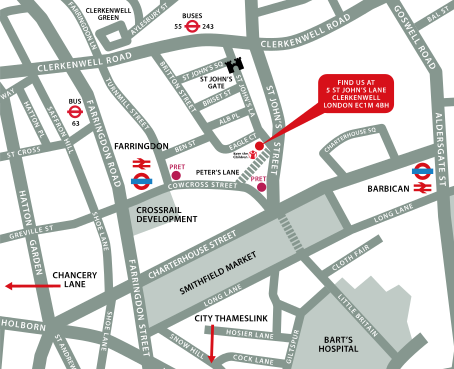
↑ Click the map to view a larger version ↑
View our London Centre Location on Google Maps
-
Express Masterclass with ACP 3 Day - Upcoming London Course Dates
18 Nov - 20 Nov £695 + vat -
Client Reviews
"The trainer was very informative and very patient! Thanks"
Trisha White, Countrywide Assured Group plc, QuarkXPress - 2 Day Introduction
"Very good training session. Was able to fill in any holes we had in experience while keeping the course on track at the same time. Will definitely consider XChange Training again in the future. "
Rob Baines, IGL Surveying, Trimble SketchUp - 1 Day Advanced
"Very helpful and fun. I felt like I'd learned a lot but hadn't been swamped with information."
Martin Faulkner, SPG Media, QuarkXPress - 1 Day Bespoke
"The trainer had an excellent knowledge of product and how to apply things in a day to day situation."
Faye Purver, Mi-Case, Photoshop - 2 Day Introduction
"Training is/was comprehensive and a good overview for the beginner. Good outline of course and structured day's learning."
Courtney Jones, SPS, InDesign Introduction - 2 Days
"Great course - in depth knowledge of the software. The instructor had a great attitude and it was a friendly environment to learn in. Great experience overall, thank you."
Pablo Segovia, After Effects - 5 Day Masterclass
"Hugely helpful and really appreciated the amount of tailoring and personalisation of the content of the course to what I would be doing in my role. Will definitely recommend. "
Emily Radforth, Octopus Healthcare, Adobe Illustrator - One Day Introduction
"Good pace and broad spectrum of basics covered, along with some harder content. Instructor was friendly, direct and highly knowledgeable. Not a pressured environment, very useful."
Jennifer Brough, Chartered Insurance Institute, Photoshop - 1 Day Introduction
"Small class, knowledgeable trainer and good pace. Thanks"
Charlotte O'Horo, Illustrator - 4 Day Masterclass
"Good pace and very clear directions. I will definitely be recommending XChange Training in the future. "
Charlotte Green, AXA Investment Managers, Powerpoint & Excel - Bespoke Introduction
 £695 + vat
Next Dates:
 18 Nov - 20 Nov £695 + vat
Over 15 years of providing certified Adobe Express training courses UK wide

5/5 Stars
Donna was lovely, very friendly, helpful and chatty. I felt very comfortable and at ease and learnt a lot from her.
16/09/2026

4/5 Stars
It was a great overview of Adobe Express, feel confident going away and getting going with it.
16/09/2026
5/5 Stars
I had quite specific requirements regarding Adobe Express training, with certain areas not needing coverage, with other areas needing more so. Donna highlighted where we should be focussing and provided a very thorough training session, answering any questions I had immediately. I couldn't ask for better. I left feeling much more comfortable with my new found knowledge.
02/03/2026
5/5 Stars
My course experience was great. Very central venue which was easy for my team to get to. A comfortable, creative environment to learn in. And Simon was really knowledgable and helpful throughout the day's learning. I am leaving with new knowledge that I look forward to putting into practice once back at work. A very worthwhile day.
04/12/2025
5/5 Stars
Great time working with Simon today. Great knowledge and found it to be very interesting as well as worthwhile for what we needed to learn about Adobe Express as well as other programmes.
04/12/2025
5/5 Stars
Lovely venue and Simon is very knowledgeable and the way he teaches is very good.
04/12/2025
5/5 Stars
Phil was so enthusiastic and helpful to the gorup, we went through it together and we were able to ask questions, go back to parts to clarify. Good structure of the day with breaks and nice informal setting. Only criticism was the content was quite basic but this is due to the branding restrictions.
16/09/2025
4/5 Stars
Phil provided great overview into the capabilities of Adobe Express and what was possible. Although we were somewhat limited by our Brand guidelines and what was possible, Phil made the session engaging and was extremely friendly.
16/09/2025
Whats Included:
 Your choice of Windows or Mac
  Certified hands-on training
  Small class size (max 4-8)
  6 months post course support
  Authorised Course Certificate
Frequently Asked Questions
What are the course times?
For all courses in the London Centre the normal session timings are 10am to 5pm with an hour break for lunch. In addition to the hour lunch break there are also two fifteen minute coffee breaks mid morning and mid afternoon.
Daily times are:
09.45 - Registration
10.00 - Course start
13.00 - Lunch
14.00 - Afternoon starts
17.00 - Course ends
Do you offer discounts
or promotions?
We offer a range of regular discounts available for self funding individuals, charities and education along with period special offers. See our promotions page for full details.
What is provided with this course?
During the course we provide all computers for your use with choice of Windows or Mac, lunch and refreshments along with pads & pens. After the course you will receive the authorised Certificate, quality reference manual and 6 months direct post course support.
Does this course give
a qualification?
Although this course does not provide an actual qualification each delegate is provided with an official Certificate for completion of the course level.
Can you invoice my company?
In short yes we can provide 30 day invoice terms to any UK Limited company with the provision of your official purchase order and/or completing the invoice request for your booking online.

Adobe Design Ready in just 5 days!
Learn Adobe Design skills with our value Adobe Design Masterclass Bundle →