
 0345 363 1130
 info@xchangetraining.co.uk


ChatGPT Introduction 1 Day - Glasgow
Level:
Introduction
Duration:
1
Day - 10am to 5pm
Price:
£329 + vat
Learn the fundamentals of ChatGPT, the powerful AI tool designed to support writing, research, idea generation and everyday productivity. This 1-day introduction course guides you through the essentials of using ChatGPT confidently, helping you understand how to interact with AI effectively and apply it to real-world tasks without technical knowledge.
After exploring the core features of ChatGPT, you’ll learn how to write clear prompts, refine responses and use AI to generate high-quality content quickly. We’ll show you how ChatGPT can support business communication, creative projects and research tasks, as well as how to review, adapt and use AI-generated outputs responsibly and efficiently in your work.
Learn the fundamentals of ChatGPT, the powerful AI tool designed to support writing, research, idea generation and everyday productivity. This 1-day introduction course guides you through the essentials of using ChatGPT confidently, helping you understand how to interact with AI effectively and apply it to real-world tasks without technical knowledge.
After exploring the core features of ChatGPT, you’ll learn how to write clear prompts, refine responses and use AI to generate high-quality content quickly. We’ll show you how ChatGPT can support business communication, creative projects and research tasks, as well as how to review, adapt and use AI-generated outputs responsibly and efficiently in your work.
-
ChatGPT Introduction 1 Day
Course Details
This 1-day ChatGPT Introduction course introduces you to the core features and capabilities of this powerful AI tool. You’ll learn how ChatGPT supports content creation, research, idea generation and productivity through natural language interaction. Whether you’re writing emails, planning projects or exploring creative ideas this course will help you use ChatGPT confidently and effectively.
ChatGPT is ideal for professionals, creatives, marketers and anyone looking to work more efficiently with AI. We’ll guide you through the interface, understanding prompts, refining responses and applying ChatGPT to real-world tasks, helping you get accurate and useful results without technical or coding knowledge.
Upon successful completion of this course, you will be able to:
- Navigate the ChatGPT interface and core features
- Write clear and effective prompts for better results
- Generate written content for business and creative use
- Refine and evaluate AI-generated responses
- Apply ChatGPT to everyday workflows and productivity tasks
Our goal is to equip you with the practical skills needed to use ChatGPT as a reliable AI assistant, supporting creative thinking, communication and efficiency in your day-to-day work.
Course Target Audience and delegate prerequisites:
This course is ideal for creatives, content creators, marketers and professionals looking to use ChatGPT to support idea generation, writing and creative workflows without technical expertise.
You will need basic PC or Mac skills, including a good understanding of your operating system. You should be able to launch applications, manage files and folders, and save or locate documents confidently.
-
Full Course Outline
The following is a general outline. The range of topics covered during your training is dependent upon student level, time available and preferences of your course booking.
Getting Started with ChatGPT- Introduction to ChatGPT and AI Language Models
- Understanding What ChatGPT Can and Can’t Do
- Exploring the ChatGPT Interface and Key Features
- Accessing ChatGPT and Account Options
- Using ChatGPT Safely, Responsibly, and Effectively
- What Is a Prompt and Why It Matters
- Writing Clear and Effective Prompts
- Using Context and Instructions for Better Results
- Refining Prompts Through Iteration
- Creating Emails, Articles, and Reports
- Adapting Tone, Style, and Audience
- Editing, Rewriting, and Improving Text
- Summarising and Expanding Content
- Brainstorming Ideas and Concepts
- Conducting Initial Research and Exploration
- Organising Information and Key Points
- Evaluating and Verifying AI-Generated Output
Applying ChatGPT to Creative and Business Tasks- Supporting Creative Thinking and Content Planning
- Using ChatGPT for Marketing and Campaign Ideas
- Improving Business Communication
- Streamlining Everyday Workflows
- Using ChatGPT to Save Time on Repetitive Tasks
- Creating Checklists, Templates, and Frameworks
- Combining ChatGPT with Existing Tools and Processes
- Best Practices for Consistent Results
- Hands-On Prompt Writing Exercises
- Applying ChatGPT to Real-World Scenarios
- Reviewing Outputs and Improving Results
- Q&A Session with Expert Guidance
-
Location Details
This course is provided at our Scotland training centre located in central Glasgow at:
Centrum Business Centre
38 Queen Street
Glasgow
G1 3DXThe Glasgow training centre is located on Queen Street in the heart of Glasgow close to Central Station, Queen Street Station and Argyle Street Station.
Daily course times run between 10am and 5pm with an hour break for lunch and both mid morning and mid-afternoon refreshment breaks. We recommend arrival at 9.45am for registration on the first day of the course.
View Full details of our Glasgow Training Venue and Course options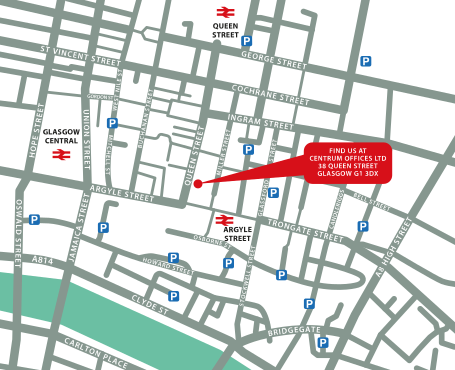
↑ Click the map to view a larger version ↑
View our Glasgow Centre Location on Google Maps
-
ChatGPT Introduction 1 Day - Upcoming Glasgow Course Dates
09 Dec - 09 Dec £329 + vat -
Client Reviews
"Fantastic course, covered everything I needed! Very professional and friendly instructor. Fantastic facilities. Great location! "
Jamie Beard, SAR Products, AutoCAD Two Day Introduction
"Very informative and easy to follow. Found it a relaxed and easy-going environment."
Natalie McKenzie, University of Derby, Colour Management Introduction
"A thoroughly enjoyable course, very useful and brilliantly tailored to our requirements. Have completed two other introductory InDesign courses and this has been the best by far. Would definitely recommend to others."
Juliet McEwan, University of Glasgow, InDesign - 2 Day Bespoke Introduction
"An amazing course! I feel I have learned so much and cant wait to put it in practice.. and I love the 6 months after care."
Rizwana Matadar, Illustrator - 2 Day Advanced
"I now feel very confident with Photoshop, the last two days have helped build my knowledge of the program and I look forward to trying out the new things I have learnt."
Alex Goodman, iris Culture, Photoshop - 1 Day Introduction
"Effective training pitched at trainees level. I have achieved what I hoped to on this course."
Tony Armstrong, Lemon Squeezy, WordPress - 2 Day Masterclass
"Very enlightening and resolved the immediate issues I was having with WordPress. "
Gillian Bardsley, Ferranti Technologies, WordPress - 1 Day Advanced
"Thanks for the brilliant course.. For someone who has basically never opened SketchUp I came away really feeling like I had a good grasp of the program."
Ellie Weidman, SketchUp - 2 Day Masterclass
"Trainer was very knowledgeable and professional - good amount of bespoke content covered."
Victoria Portwin, Gottex, InDesign - 1 Day Bespoke
"Very good training session. Was able to fill in any holes we had in experience while keeping the course on track at the same time. Will definitely consider XChange Training again in the future. "
Rob Baines, IGL Surveying, Trimble SketchUp - 1 Day Advanced
 £329 + vat

Next Dates:
 09 Dec £329 + vat
Whats Included:
 Your choice of Windows or Mac
  Certified hands-on training
  Small class size (max 4-8)
  6 months post course support
  Authorised Course Certificate
Frequently Asked Questions
What are the course times?
For all courses in the London Centre the normal session timings are 10am to 5pm with an hour break for lunch. In addition to the hour lunch break there are also two fifteen minute coffee breaks mid morning and mid afternoon.
Daily times are:
09.45 - Registration
10.00 - Course start
13.00 - Lunch
14.00 - Afternoon starts
17.00 - Course ends
Do you offer discounts
or promotions?
We offer a range of regular discounts available for self funding individuals, charities and education along with period special offers. See our promotions page for full details.
What is provided with this course?
During the course we provide all computers for your use with choice of Windows or Mac, lunch and refreshments along with pads & pens. After the course you will receive the authorised Certificate, quality reference manual and 6 months direct post course support.
Does this course give
a qualification?
Although this course does not provide an actual qualification each delegate is provided with an official Certificate for completion of the course level.
Can you invoice my company?
In short yes we can provide 30 day invoice terms to any UK Limited company with the provision of your official purchase order and/or completing the invoice request for your booking online.