
 0345 363 1130
 info@xchangetraining.co.uk


Midjourney Introduction 1 Day - London
Level:
Introduction
Duration:
1
Day - 10am to 5pm
Price:
£369 + vat
After we introduce you to the Midjourney interface, we will show you how to generate images from text prompts, explore creative variations and refine visual results. You will learn how Midjourney can be used to develop ideas quickly and experiment with different styles and visual directions.
We will also demonstrate how Midjourney images can be used alongside professional design tools, allowing you to take AI-generated artwork further. By the end of the session, you will understand how to move from concept to finished visual while keeping creative control and quality.
After we introduce you to the Midjourney interface, we will show you how to generate images from text prompts, explore creative variations and refine visual results. You will learn how Midjourney can be used to develop ideas quickly and experiment with different styles and visual directions.
We will also demonstrate how Midjourney images can be used alongside professional design tools, allowing you to take AI-generated artwork further. By the end of the session, you will understand how to move from concept to finished visual while keeping creative control and quality.
-
Midjourney Introduction 1 Day
Course Details
This 1-day Introduction course helps you learn how to use Midjourney for AI image generation and creative exploration. You will gain an understanding of how to create, refine and develop visual content from text prompts, and how Midjourney can support concept development and design workflows.
Upon successful completion of this course, you will be able to:
- Navigate the Midjourney interface
- Create images and artwork from text prompts
- Control style, composition and visual direction
- Refine and improve AI-generated images
- Use variations to explore creative ideas
- Apply effective prompt-writing techniques
- Understand how Midjourney subscriptions and usage limits work
- Use Midjourney outputs in real creative projects
Our goal is for you to feel confident using Midjourney to generate and develop creative ideas as part of your everyday design workflow.
Course Target Audience and delegate prerequisites:
This course is intended for designers, content creators and marketers, as well as those working in advertising agencies, creative studios, in-house marketing teams and digital production departments who want to use generative AI as part of their creative process.
To attend this course you should have a basic understanding of digital design or creative workflows which will be helpful in the session.
-
Full Course Outline
The following is a general outline. The range of topics covered during your training is dependent upon student level, time available and preferences of your course booking.
Getting Started with Midjourney- Understanding what Midjourney is and how it is used in creative workflows
- How Midjourney works with Discord
- Setting up and accessing Midjourney
- Understanding generative AI image creation
- Navigating the Midjourney interface and commands
- Writing clear and effective prompts
- Generating images from text
- Understanding prompt structure and keywords
- Exploring visual styles and moods
- Using variations and upscaling
- Adjusting artistic style and tone
- Controlling realism and illustration styles
- Using aspect ratios and image formats
- Applying reference images for visual consistency
- Using style and seed controls
- Using parameters to control output
- Prompt weighting and emphasis
- Using negative prompts
- Multi-prompt techniques
- Image blending and remix mode
- Creating image variations
- Upscaling and enhancing details
- Re-rolling and refining outputs
- Keeping visual consistency across a series
- Building creative concepts through iterations
Using Midjourney for Creative Projects- Concept art and mood boards
- Marketing and advertising visuals
- Social media and digital content
- Illustration and artwork
- Product and brand visuals
- How Midjourney plans and credits work
- Fast vs Relaxed modes
- Managing generation time efficiently
- Understanding usage limits
- Writing consistent and repeatable prompts
- Maintaining brand and visual style
- Understanding copyright and usage rights
- Using AI imagery responsibly
- Downloading generated images
- Upscaled file formats
- Preparing images for Photoshop and design tools
- Using Midjourney artwork in print and digital projects
-
Location Details
This course is provided at the XChange Training London training centre based at:
5 St John’s Lane
Clerkenwell
London
EC1M 4BHSt John’s Lane is located in the heart of Clerkenwell close to the junction of Farringdon and Clerkenwell Road. Farringdon tube & train station is just a few minutes away and the training centre can also be accessed from Chancery Lane and Barbican tubes in about 10 minutes. There is also easy direct access by bus from Waterloo (243) and West End (55) with nearby stops.
Daily course times run between 10am and 5pm with an hour break for lunch and both mid morning and mid-afternoon refreshment breaks. We recommend arrival at 9.45am for registration on the first day of the course.
View Full details of our London Training Venue and Course options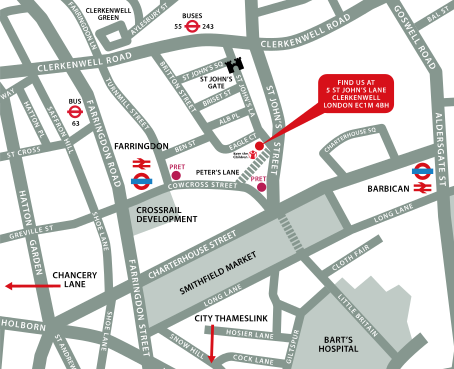
↑ Click the map to view a larger version ↑
View our London Centre Location on Google Maps
-
Midjourney Introduction 1 Day - Upcoming London Course Dates
29 Oct - 29 Oct £369 + vat 21 Dec - 21 Dec £369 + vat -
Client Reviews
"Very organized training course covered all the basics needed and ran efficiently and in a nice relaxed and amenable environment."
Amaya Climent, The Crown Estate, InDesign - 1 Day Essentials
"The whole experience has far supassed my expectations. From the facilities, to the trainer its been really good. Would recommend it to anyone."
Victor Vieira, liveRES, HTML & CSS Introduction - 2 Days
"I found the instructor very helpful and knowledgeable. I would like to return for further training..."
Rebecca Sanderson, Frank Cass, Database Publishing - 1 Day Introduction
"Fantastic two day course on InDesign, well worth doing. Staff very friendly. 10 out of 10"
Daniel Kosta, Icon Productions, InDesign - 2 Day Introduction
"Great training experience!"
Ian Graham, Huntingdon, Digital Publishing Suite - 2 Day Introduction
"Training was great. Couldn't have asked for better!"
Lee Weaver, UBM, HTML & CSS - 2 Day Introduction
"Brilliant two days. I was sceptical about how much we would learn in two days but now feel like I am definitely ready and eager to use InDesign on my own. The facilities were great and the class size perfect and it is brilliant that we receive a book to help us through post-course use of the software. Nice relaxed atmosphere. "
Emma Bedford, Wem Town Hall Trust, InDesign - Two Day Introduction
"Very good and extremely informative. Complicated enough to be challenging yet explained well enough to not put me off. Thanks!"
Will Jobbins, Freelance, WordPress - 2 Day Introduction
"Thanks for a very pleasant and educational 2 days. I think it was especially good because it was a small class which gave very individual training."
Nigel Hopwood, Jacob Jensen Design, InDesign - 2 Day Advanced
"Really informative and useful training, I learnt so much about DaVinci Resolve within just 2 days. This training course has now really given me the confidence to use this software more efficiently."
Emma Pink, Guys & St Thomas NHS Trust, DaVinci Resolve Editing - 2 Day Introduction
 £369 + vat

Next Dates:
 29 Oct £369 + vat
21 Dec £369 + vat
Whats Included:
 Your choice of Windows or Mac
  Certified hands-on training
  Small class size (max 4-8)
  6 months post course support
  Digital Learning Materials
  Authorised Course Certificate
Frequently Asked Questions
What are the course times?
For all courses in the London Centre the normal session timings are 10am to 5pm with an hour break for lunch. In addition to the hour lunch break there are also two fifteen minute coffee breaks mid morning and mid afternoon.
Daily times are:
09.45 - Registration
10.00 - Course start
13.00 - Lunch
14.00 - Afternoon starts
17.00 - Course ends
Do you offer discounts
or promotions?
We offer a range of regular discounts available for self funding individuals, charities and education along with period special offers. See our promotions page for full details.
What is provided with this course?
During the course we provide all computers for your use with choice of Windows or Mac, lunch and refreshments along with pads & pens. After the course you will receive the authorised Certificate, quality reference manual and 6 months direct post course support.
Does this course give
a qualification?
Although this course does not provide an actual qualification each delegate is provided with an official Certificate for completion of the course level.
Can you invoice my company?
In short yes we can provide 30 day invoice terms to any UK Limited company with the provision of your official purchase order and/or completing the invoice request for your booking online.

Adobe Design Ready in just 5 days!
Learn Adobe Design skills with our value Adobe Design Masterclass Bundle →