
 0345 363 1130
 info@xchangetraining.co.uk


Adobe InDesign CC Advanced 2 Days - Bristol
Level:
Advanced
Duration:
2
Days - 10am to 5pm
Price:
£495 + vat
Join the professionals in getting the best out of the world's leading desktop-publishing program. Our course will show you how to unlock the power of InDesign's advanced tools and help you to become more proficient and confident in laying out documents.
With our help, you will take your existing InDesign know-how and enhance it as you learn how to create interactive PDFs, eBooks, and more. We will show you how to work more efficiently by saving re-usable data and storing PDF presets. This course is a great way to step up to expert level by increasing the quality, consistency, and speed of your output.
Join the professionals in getting the best out of the world's leading desktop-publishing program. Our course will show you how to unlock the power of InDesign's advanced tools and help you to become more proficient and confident in laying out documents.
With our help, you will take your existing InDesign know-how and enhance it as you learn how to create interactive PDFs, eBooks, and more. We will show you how to work more efficiently by saving re-usable data and storing PDF presets. This course is a great way to step up to expert level by increasing the quality, consistency, and speed of your output.
-
InDesign Advanced 2 Days
Course Details
This 2-day Advanced course will help to develop your skills as you explore the advanced features of Adobe InDesign CC. We will help you understand how this industry-leading program takes desktop publishing and design to a new level, and combines production power and creative freedom with tight integration with Photoshop, Illustrator, and Acrobat software.
You will already understand the basics of the program, and we will show you how to take that knowledge to the next level. We will cover advanced topics such as creating eBooks, generating indexes, and automating workflows.
Upon successful completion of this course, you will be able to:
- Create complex documents such as interactive PDFs and eBooks
- Use advanced tools and palettes
- Re-use data via libraries and snippets
- Generate tables of contents and indexes
- Store PDF presets
This course is the perfect preparation if you plan to take the Adobe Certified Expert (ACE) exam.
Our goals are for you to understand the advanced features of InDesign and for you to become a confident power user.
Course Target Audience and delegate prerequisites:
This course is intended for those who wish to enhance their existing knowledge of InDesign and who work as graphic designers, creative professionals, print professionals, publishers, pre-press professionals, or marketing communications professionals.
You will need basic experience in using InDesign. Ideally, you will have taken our Adobe InDesign CC Introduction 2 Day course.
-
Full Course Outline
The following is a general outline. The range of topics covered during your training is dependent upon student level, time available and preferences of your course booking.
Managing Your Workspaces- Organising Your Panels
- Advanced Zooming and Navigation
- Advanced View Options
- Typographical preferences
- Advanced Character formatting options
- Advanced Paragraph formatting options
- Review of setting up Style Sheets
- Advanced Style Sheet Tips
- Nested Styles
- Using ‘Based on’, ‘Next Style’ and Quick Apply
- Review of setting up Parent Pages
- Parent & Child masters
- Overriding Parent Page items
- Using ‘Shuffle’ options
- Best practice with Parent pages
- Numbering and Section options
- Advanced Align options
- Using keyboard shortcuts for align and distribute
- Using the Gap tool
- Using Autofit for images
- Review of setting up Object Styles
- Setting up a Baseline Grid
- Creating custom frames and objects with the pen tool
- Review of Swatches – managing colours and gradients
- Creating Mixed Inks
- Using the Ink Manager
- Sharing Swatches between documents and with Photoshop and Illustrator
Spot Colours- Create new pantone swatches
- Spot or process considerations
- Creating a mixed-ink group
- Editing a mixed-ink group
- Live preflight
- Defining profiles
- Importing and exporting
- Embedding profiles
- PDF/X ISO standards
- Colour transformations
- Registration marks
- Trim and bleed geometry
- Creating a data set
- Formatting data merge
- Merging data
- Formatting options
- Importing data
- Creating a table
- Modifying a table
- Formatting a table
- Creating cell styles
- Creating table styles
- Applying table styles
- Style tips and tricks
-
Location Details
This course is provided at the Bristol training centre located at:
The Waterfront
Welsh Back
Bristol
BS1 4SB
The training centre is conveniently located in central Bristol in the popular Waterfront area of the city and is easily accessible from Bristol Temple Meads.
Daily course times run between 10am and 5pm with an hour break for lunch and both mid morning and mid-afternoon refreshment breaks.
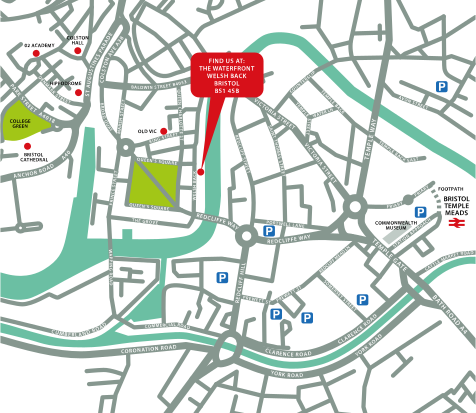
↑ Click the map to view a larger version ↑
-
InDesign Advanced 2 Days - Upcoming Bristol Course Dates
25 Nov - 26 Nov £495 + vat -
Client Reviews
"Got everything out the course I wanted to. The trainer was great, really knew his stuff and helped to cover the areas we would be using in our jobs. Fantastic!"
Chad Doyle, Stockport Council, InDesign - 4 Day Masterclass
"The training was excellent, well paced and all of our questions were answered. There was time at the end to put into practice what had been learnt and ask further questions or queries. Prepared handouts were are clear and useful for future reference."
Kerry Willis, Paignton Zoo, InDesign - 1 Day Introduction
"Excellent explanation, professional and friendly approach. Very clear in explanations. Overall an excellent trainer."
Andrew Shelmerdine, Vinci Academy, InDesign - 2 Day Advanced
"Excellent. Course was tailored to our requirements, so didn't feel that any time was wasted."
Susanna Booth, Competition Comm., InDesign - 1 Day Introduction
"Brilliant two days. I was sceptical about how much we would learn in two days but now feel like I am definitely ready and eager to use InDesign on my own. The facilities were great and the class size perfect and it is brilliant that we receive a book to help us through post-course use of the software. Nice relaxed atmosphere. "
Emma Bedford, Wem Town Hall Trust, InDesign - Two Day Introduction
"I found the course very enjoyable. After using InDesign for a year just teaching myself how to do things, it is good to now know how to do them properly! Thank you very much."
Justine Rich, Capita, InDesign - 2 Day Introduction
"A thoroughly enjoyable course, very useful and brilliantly tailored to our requirements. Have completed two other introductory InDesign courses and this has been the best by far. Would definitely recommend to others."
Juliet McEwan, University of Glasgow, InDesign - 2 Day Bespoke Introduction
"It was an informative two days I now feel confident enough to design and create my own brochures and have picked up some handy short cuts."
Lauren Partakis, Fairhome Group, Adobe InDesign - Two Day Introduction
"Excellent course, excellent trainer. Learnt so much. We covered lots of things I had tried to do before with much difficulty. The training made things simple, I will be much more efficient now! "
Laura Millar, FCA, Adobe InDesign - Two Day Introduction
"Clear, easy to follow training, well paced and interactive with positive tutition. Interesting and enjoyable, would recommend."
Emma Fullalove, Tom Parker Ltd, InDesign - 2 Day Introduction
 £495 + vat
Next Dates:
 25 Nov - 26 Nov £495 + vat
Over 15 years of providing certified Adobe InDesign training courses UK wide

5/5 Stars
Great trainer, great course.
20/10/2026
5/5 Stars
The instructor was very knowledgeable and explained things clearly and patiently. I learnt a lot! Colleagues joining online had some technical issues which did not affect the session but sometimes were not relevant to course learning.
06/10/2026
5/5 Stars
A few moments there was a lot to take in and I got a bit left behind, but when I asked for a recap it was happily provided
06/10/2026

4/5 Stars
Training delivery by Donna was fantastic and the course has really set me up for working in InDesign after having only Photoshop experience. My only negative point is that I found the continual interruptions and clarification requests from another student (Seraphina) really distracting. This was a combination of not listening / following along and an inadequate machine being used to run InDesign. I know the course is for all skills levels, but Donna had to repeat pretty much every instruction. It would be great if a machine spec was provided to attendees to perhaps prevent that aspect going forward. Big thanks to Donna, I'll definitely recommend to the wider team for ongoing skills building!
06/10/2026
5/5 Stars
I really enjoyed the course and found it both informative and engaging. Donna delivered the content in a clear and engaging way, making what could have been a fairly dry subject interesting and accessible. I also picked up some useful InDesign tips and techniques along the way, which was great. Overall, a very worthwhile and enjoyable learning experience.
23/09/2026
5/5 Stars
I really enjoyed the course. Having no background in InDesign, I feel confident in using the application now. Doug's expertise and experience as a graphic designer really helped to understand the different tools and their utility. I could always ask questions, everything was really clear.
08/09/2026
5/5 Stars
Phil was excellent, very friendly and knowledgeable. The course was interesting, and gave very useful insights into Indesign.
08/09/2026
5/5 Stars
Really relaxed environment and insightful. Felt comfortable to ask questions and the pace of learning was good.
08/09/2026
4/5 Stars
Very very helpful especially for learning about shortcuts within indesign
07/09/2026
5/5 Stars
Phil was excellent and very passionate about the subject, patient and helpful. I wish I could have done the second day but my company's budget wouldn't allow!
07/09/2026
Whats Included:
 Your choice of Windows or Mac
  Certified hands-on training
  Small class size (max 4-8)
  6 months post course support
  Digital Learning Materials
  Authorised Course Certificate
Frequently Asked Questions
What are the course times?
For all courses in the London Centre the normal session timings are 10am to 5pm with an hour break for lunch. In addition to the hour lunch break there are also two fifteen minute coffee breaks mid morning and mid afternoon.
Daily times are:
09.45 - Registration
10.00 - Course start
13.00 - Lunch
14.00 - Afternoon starts
17.00 - Course ends
Do you offer discounts
or promotions?
We offer a range of regular discounts available for self funding individuals, charities and education along with period special offers. See our promotions page for full details.
What is provided with this course?
During the course we provide all computers for your use with choice of Windows or Mac, lunch and refreshments along with pads & pens. After the course you will receive the authorised Certificate, quality reference manual and 6 months direct post course support.
Does this course give
a qualification?
Although this course does not provide an actual qualification each delegate is provided with an official Certificate for completion of the course level.
Can you invoice my company?
In short yes we can provide 30 day invoice terms to any UK Limited company with the provision of your official purchase order and/or completing the invoice request for your booking online.

Adobe Design Ready in just 5 days!
Learn Adobe Design skills with our value Adobe Design Masterclass Bundle →