
 0345 363 1130
 info@xchangetraining.co.uk


Adobe Photoshop CC Introduction 2 Days - Guildford
Level:
Introduction to Intermediate
Duration:
2
Days - 10am to 5pm
Price:
£495 + vat
Learn the fundamentals of Photoshop as we guide you through this comprehensive introduction to the number one image-manipulation program. We will show you how to adjust and enhance images. This is the perfect starting point for anyone interested in photographic visuals.
After we give you a complete tour of the Photoshop environment, we will show you how to adjust images, create compositions, fix common photo issues, apply colour fills and gradients, and adjust and style text and layers. With our guidance, your artwork will be ready for output to the web.
Learn the fundamentals of Photoshop as we guide you through this comprehensive introduction to the number one image-manipulation program. We will show you how to adjust and enhance images. This is the perfect starting point for anyone interested in photographic visuals.
After we give you a complete tour of the Photoshop environment, we will show you how to adjust images, create compositions, fix common photo issues, apply colour fills and gradients, and adjust and style text and layers. With our guidance, your artwork will be ready for output to the web.
-
Photoshop Introduction 2 Days
Course Details
This 2-day Introduction course helps you learn about the tools and features available in Adobe Photoshop. We will help you understand how this industry-leading program takes image manipulation to a new level. You will use the program's tools for painting, retouching, and enhancing images by using selections and layers.
Upon successful completion of this course, you will be able to:
- Navigate the Photoshop environment
- Select parts of an image in several ways
- Enhance images by using Adjustment Layers and Smart Sharpen
- Understand tools used for painting and retouching images
- Fill areas with colour and gradients
- Blend images to create simple compositions
- Create type and produce simple adverts
- Resize images for the web and for print
- Add, adjust and style both text and layers
- Output artwork for the web
- Prepare images for print
Our goal is for you to understand the basics of adjusting and enhancing images.
Course Target Audience and delegate prerequisites:
This course is intended for digital artists and photographers as well as those who work for advertising agencies, design agencies, marketing agencies, production houses, and specialist corporate departments.
You will need basic PC or Mac skills, including a good understanding of your operating system. You should be able to launch applications, manage files and folders, and save or locate documents confidently.
-
Full Course Outline
The following is a general outline. The range of topics covered during your training is dependent upon student level, time available and preferences of your course booking.
Managing the Adobe Photoshop Environment- Exploring the Interface
- Managing Panels
- Adjusting and Saving your Workspace
- Zooming in and out and moving around
- Using Undos with the History Panel
- Creating Selections using Marquee, Magic Wand, Quick Selection and Lasso tools
- Adding and Subtracting from a selection
- Transforming a Selection
- Modifying a Selection using Select and Mask
- Saving and Reloading a Selection
- Cropping an image
- Using Levels and Curves Adjustment Layers
- Using Hue/Saturation Adjustment Layer
- Using Colour Balance Adjustment Layer
- Sharpening using Smart Sharpen
- Basics of Painting
- Clone Stamp and Healing Brush tools
- Using the Filter Gallery
- Creating New Layers
- Transforming Layer Objects
- Applying Transparency and changing the Blend modes
- Adding Text
- Creating Layer Masks
- Adding Layer Styles
Working with Colour- Choosing colours
- Using the Eyedropper tool
- Filling an area with colour
- Creating gradients
- Using the Type tool
- Formatting Text
- Adding Layer styles to Text
- Rasterising text
- Sizing images for web pages
- Sizing images for print
- Resizing images
- Changing the Canvas Size
- Understanding different file types
- Saving for Web
- Understanding the Print options
- Working non-destructively with Layer Masks
- Creating Layer Masks
- Editing Layer Masks
- Creating Fading Effects with Layer Masks
-
Location Details
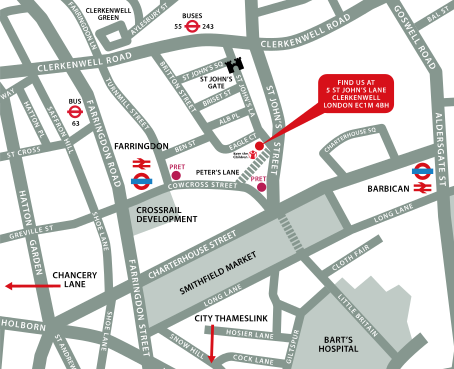
This course is provided at the Guildford training centre located at:
Surrey Technology Centre
40 Occam Road
The Surrey Research Park
Guildford
Surrey
GU2 7YG
The training centre is located in the Surrey Technology Centre, close to the Royal Surrey County Hospital in Guildford and there is free parking available for course attendees.
Daily course times run between 10am and 5pm with an hour break for lunch and both mid morning and mid-afternoon refreshment breaks.
-
Photoshop Introduction 2 Days - Upcoming Guildford Course Dates
28 Oct - 29 Oct £495 + vat 09 Nov - 10 Nov £495 + vat -
Client Reviews
"Great course, great tutor - really enjoyed it! Cheers!"
Simon Thompson, Bedford Borough Council, Photoshop - 2 Day Intermediate
"Overall I feel the Photoshop course was great. The tutor was patient and had a great in depth knowledge on Photoshop. All in all I had a great day and I feel like I'm a more confident Photoshop user thanks to the trainer and XChange training. "
Jonathan Ford, Bos Ltd, Adobe Photoshop - 1 Day Advanced
"Our instructor put us at ease immediately and explained all course content very clearly and efficiently. He quickly realised what level we were at and adapted the content to suit. "
Lynn McBean, Material MC, Photoshop - 1 Day Bespoke
"The course was well informed and our tutor was very knowledgeable and patient with all students. I would highly recommend this course and XChange Training for the future. "
Jenni Prichard, Kinleigh Folkard & Hayward, Photoshop - 2 Day Introduction
"The trainer was excellent and able to answer any questions I had. Great conditions and excellent helpful staff throughout my day."
Steven Arnoldi, M & G, Photoshop - 1 Day Introduction
"Easy to book and good service. Nice classroom setting, good course content and enjoyable experience. Would recommend to anyone."
Thomas Barton, HSBC, Photoshop - 2 Day Introduction
"Good basic introduction to Photoshop but included some advanced elements that could be expanded on with further reading/training."
Karen Hartley, J Murphy & Sons, Photoshop - 2 Day Introduction
"Trainer and content of the course were both excellent and exactly what I was after. With only two of us in the group we were really able to adapt the course to our personal needs and even work through real life examples. Would definitely recommend to any of my colleagues."
Claire Douglas, Centrica, Adobe Photoshop - One Day Introduction
"The instructor was clearly knowledgeable of their subject. Pacing was good and the content was applied to the different backgrounds of the people who were present. All staff were courteous - good facilities."
Bruce Fleming, Central Park Primary School, Photoshop - 2 Day Advanced
"The trainer was very helpful and approachable and we got answers to all our questions. Great course!"
Aspasia Valiasi, FilmFlex Movies, Photoshop - 1 Day Introduction
 £495 + vat
Next Dates:
 28 Oct - 29 Oct £495 + vat
09 Nov - 10 Nov £495 + vat
Over 15 years of providing certified Adobe Photoshop training courses UK wide

4/5 Stars
I felt that the course was full of useful information that I will be able to use in my role. The instructor was deeply knowledgeable about Photoshop and it was clear he has a passion for it. There were times when I felt we spent too long on a topic (such as filters, which I probably will not use in my job, or file types). However, I understand that other delegates may find these more useful and may have needed additional time with them. It would have been good to do more hands-on independent photoshop work while having the instructor there to give feedback.
12/08/2026

5/5 Stars
A very useful course which was tailored to the work I do. The trainer was friendly and patient, ensuring I understood everything before moving on. Thank you!
27/07/2026
5/5 Stars
Was really informative and Doug was extremely helpful and friendly. Answered all my questions. Feel like I learnt everything I wanted to and excited to take away to use these new skills into my job.
14/05/2026
5/5 Stars
A lot of new information and as someone who is really new to the industry, at times was a little overwhelming; however I found Doug really patient and understanding.
14/05/2026
5/5 Stars
Thank you very much for this course on Photoshop, I already knew a little bit about the application, but after this course, I feel much more confident in a lot of the areas in Photoshop, there were a lot of tools and shortcuts that I wasn't aware of. Now I feel confident enough in my knowledge to work on Company collateral.
14/05/2026
5/5 Stars
really friendly
02/04/2026
5/5 Stars
I found it very easy to follow Doug but I found it hard to write notes and practice the techniques too. I have lots to experiment with though at home and with colleagues at work
12/03/2026
5/5 Stars
The instructor was amazing- it helped that she had industry understanding and was able to tailor the course to all three of the participants to who all had different needs and uses of the program.
13/02/2026
5/5 Stars
Amazing.
12/02/2026
5/5 Stars
The overall experience was great, I'm very happy with and all the knew things I've learnt.
12/02/2026
Whats Included:
 Your choice of Windows or Mac
  Certified hands-on training
  Small class size (max 4-8)
  6 months post course support
  Digital Learning Materials
  Authorised Course Certificate
Frequently Asked Questions
What are the course times?
For all courses in the London Centre the normal session timings are 10am to 5pm with an hour break for lunch. In addition to the hour lunch break there are also two fifteen minute coffee breaks mid morning and mid afternoon.
Daily times are:
09.45 - Registration
10.00 - Course start
13.00 - Lunch
14.00 - Afternoon starts
17.00 - Course ends
Do you offer discounts
or promotions?
We offer a range of regular discounts available for self funding individuals, charities and education along with period special offers. See our promotions page for full details.
What is provided with this course?
During the course we provide all computers for your use with choice of Windows or Mac, lunch and refreshments along with pads & pens. After the course you will receive the authorised Certificate, quality reference manual and 6 months direct post course support.
Does this course give
a qualification?
Although this course does not provide an actual qualification each delegate is provided with an official Certificate for completion of the course level.
Can you invoice my company?
In short yes we can provide 30 day invoice terms to any UK Limited company with the provision of your official purchase order and/or completing the invoice request for your booking online.

Adobe Design Ready in just 5 days!
Learn Adobe Design skills with our value Adobe Design Masterclass Bundle →