
 0345 363 1130
 info@xchangetraining.co.uk


Canva Introduction 1 Day - Manchester
Level:
Introduction
Duration:
1
Day - 10am to 5pm
Price:
£275 + vat
Learn the basics of Canva, the user-friendly design tool for creating eye-catching graphics, social media content and marketing materials. Our introduction will guide you through the first steps of designing professional-quality visuals with ease.
After exploring the essentials of the Canva workspace, we’ll show you how to combine text, images and design elements to produce high-quality content quickly. You’ll learn how easy it is to create social media posts, flyers and presentations, as well as export and share your work effortlessly, including producing professional PDFs and digital assets.
Learn the basics of Canva, the user-friendly design tool for creating eye-catching graphics, social media content and marketing materials. Our introduction will guide you through the first steps of designing professional-quality visuals with ease.
After exploring the essentials of the Canva workspace, we’ll show you how to combine text, images and design elements to produce high-quality content quickly. You’ll learn how easy it is to create social media posts, flyers and presentations, as well as export and share your work effortlessly, including producing professional PDFs and digital assets.
-
Canva Introduction 1 Day
Course Details
This 1-day Canva Essentials course introduces you to the tools and features of this versatile, user-friendly design platform. You'll learn how Canva simplifies content creation with its drag-and-drop interface, extensive template library, and collaboration tools. Whether you're designing social media graphics, marketing materials, or presentations, this course will help you create professional-quality visuals quickly and effortlessly.
Canva is ideal for marketers, content creators, small business owners, and anyone looking to design eye-catching visuals without advanced skills. We’ll guide you through the workspace, working with templates, text, and images, and customising designs to match your brand.
Upon successful completion of this course, you will be able to:
- Navigate the Canva interface and key tools
- Create stunning social media posts, flyers, and presentations
- Customise templates, fonts, and brand elements
- Edit images, remove backgrounds, and apply effects
- Export and share your designs efficiently
Our goal is to equip you with the skills to create visually compelling content with ease, whether for digital marketing, business branding, or personal projects.
Course Target Audience and delegate prerequisites:
This course is ideal for marketers, social media managers, small business owners, content creators, educators and anyone looking to create professional-quality designs quickly and efficiently without advanced design skills.
You will need basic PC or Mac skills, including a good understanding of your operating system. You should be able to launch applications, manage files and folders, and save or locate documents confidently.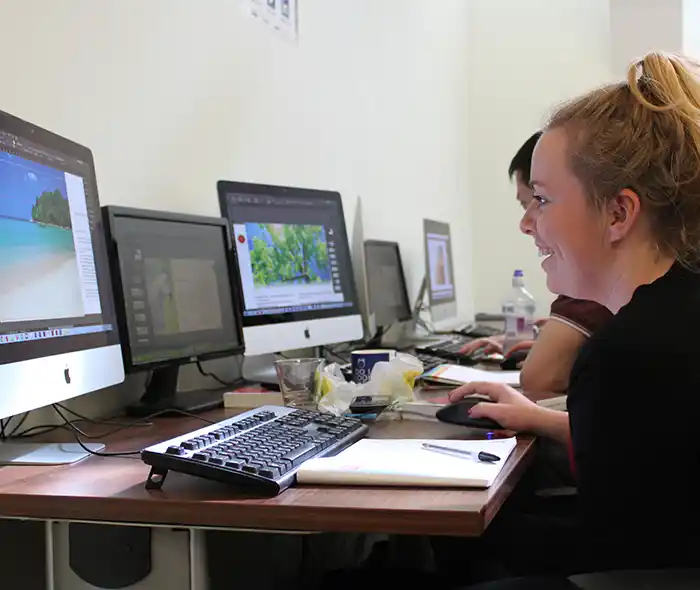
-
Full Course Outline
The following is a general outline. The range of topics covered during your training is dependent upon student level, time available and preferences of your course booking.
Getting Started with Canva- Introduction to Canva and Its Uses
- Understanding the Cloud-Based Workflow
- Exploring the Interface and Key Features
- Setting Up Your Canva Account
- Customising Preferences and Branding
- Using and Customising Pre-Made Templates
- Creating Social Media Graphics
- Designing Posters, Flyers, and Marketing Materials
- Working with Brand Kits for Consistency
- Adding and Formatting Text
- Applying Text Effects and Animations
- Using Font Pairing for Professional Design
- Creating and Saving Text Styles
- Importing and Editing Images
- Using Canva’s Free and Pro Media Libraries
- Applying Filters and Enhancements
- Removing Backgrounds with One-Click Tools (Pro Feature)
Using Elements, Icons, and Brand Assets- Adding and Customising Shapes
- Using Icons and Illustrations
- Applying Brand Colours and Logos
- Aligning and Arranging Elements
- Introduction to Video Creation in Canva
- Adding and Editing Video Clips
- Applying Motion Effects and Transitions
- Adding Music and Voiceovers
- Exporting Projects for Social Media and Print
- Downloading and Sharing Files
- Collaboration and Team Sharing Features
- Best Practices for File Formats
- Creating a Custom Design from Scratch
- Optimising Workflow for Efficiency
- Final Review and Feedback
- Q&A Session with Expert Guidance
-
Location Details
This course is provided at the XChange Training Manchester training centre based at:
Piccadilly House
49 Piccadilly
Manchester
M1 2APPiccadilly House is located in the heart of Manchester directly next to the Piccadilly Gardens transport interchange with excellent bus and tram connections and is easily accessed from Piccadilly train Station (5 mins). Victoria station is also close by (around 10 mins).
Daily course times run between 10am and 5pm with an hour break for lunch and both mid morning and mid-afternoon refreshment breaks. We recommend arrival at 9.45am for registration on the first day of the course.
View Full details of our Manchester Training Venue and Course options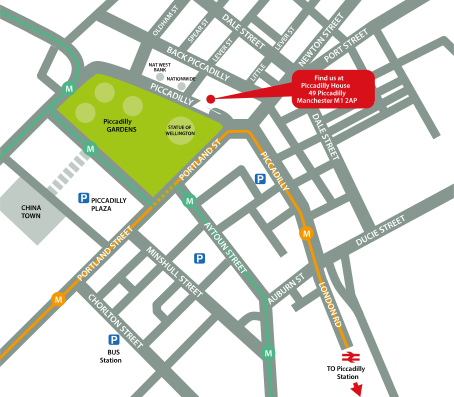
↑ Click the map to view a larger version ↑
View our Manchester Centre Location on Google Maps
-
Canva Introduction 1 Day - Upcoming Manchester Course Dates
16 Dec - 16 Dec £275 + vat 08 Mar - 08 Mar £275 + vat 12 May - 12 May £275 + vat 12 Jul - 12 Jul £275 + vat -
Client Reviews
"An excellent course with very knowledgeable and helpful instructor allowing us to ask questions and work at our own pace. "
Jill Lessani, Hawkins, Acrobat - 1 Day Introduction
"Really enjoyed the course. Presented a comprehensive overview of Articulate and helped us out with any queries we had."
Chris Bateman, Glasgow Caledonian Uni, Articulate Storyline - 2 Day Introduction
"Very accommodating environment, friendly staff, excellent instructor and added extra benefits from the course i.e food vouchers, resource books and contact information."
Abbie Hulson, 2 Day Illustrator Advanced
"Great training experience!"
Ian Graham, Huntingdon, Digital Publishing Suite - 2 Day Introduction
"Excellent training course and facilities - practical and easy to understand with knowledgeable and helpful Instructor. "
Neil Cleary, IMP Planning Ltd, SketchUp - 1 Day Introduction
"The instructor was very clear and constructive. Good examples to work through."
Alex Farr, University of Portsmouth, Flash - 3 Day Introduction
"Thoroughly enjoyed the course and came away with plenty of great hints and tips."
Andrew Hobbs, Rickstone Academy, Web Combo - 4 Day Masterclass
"Very in-depth and thorough training for people completely new to the program. Covers everything you'd need to know at a very reasonable pace."
Andy Porter, Breaking Free Online, InDesign Introduction - 2 Days
"The 6 months support available is a fantastic addition to the course and I would definitely use XChange Training again in the future."
Charles Townsend, MRM Meteorite, Maxon Cinema 4D - 2 Day Intermediate
"Found the course extremely interesting and tremendously useful. The instructor was a fountain of knowledge and provided great training materials to actively use. Although the course had a lot of commercial content there was so much that was absolutely relevant to the classroom. The attention to detail and excellence is quite inspiring."
John Whitehead, Hawkley High School, Premiere Pro - 2 Day Advanced
 £275 + vat
Next Dates:
 16 Dec £275 + vat
08 Mar £275 + vat
12 May £275 + vat
12 Jul £275 + vat
Over 15 years of providing certified Canva training courses UK wide

5/5 Stars
really enjoyed course and i've already emailed my boss to get further training via this company
04/09/2026
5/5 Stars
Enjoyed the course, it was very helpful to learn more about Canva, including features I haven't used before and useful shortcuts. It was also good to learn about it from a design perspective and Simon's knowledge and design background also helped to make it interesting.
04/09/2026
5/5 Stars
Broad coverage of fairly difficult material. Excellent teaching, with enthusiasm, patience and great vision
18/06/2026
5/5 Stars
I am new to Canva and I needed to get professional guidance and this course provided me with all the answers to my queries and I will now get to practice with the video that will be sent me. Thank you
02/06/2026
5/5 Stars
Phil was a lovely teacher, very helpful in demonstrating techniques and answering any questions.
02/06/2026
5/5 Stars
I learned various Canva skills of how to create assets across all different styles. I now feel confident to make whatever material needed.
02/06/2026

4/5 Stars
Good course structure and flow. Delivered a good pace for new learners to understand and lots of oppertunity to follow along for embeded understanding.
07/05/2026
4/5 Stars
Learned new skills which is always what I want to take away from training. Also confirmed that my self taught ways were right and how I could take them to the next level.
30/04/2026
4/5 Stars
Great training session
29/04/2026
4/5 Stars
For me, I can search online for shortcuts, getting round the functionality of the software is more useful to me & knowing the idiosyncrasies that will cause me problems when I go to use it.
29/04/2026
Whats Included:
 Your choice of Windows or Mac
  Certified hands-on training
  Small class size (max 4-8)
  6 months post course support
  Authorised Course Certificate
Frequently Asked Questions
What are the course times?
For all courses in the London Centre the normal session timings are 10am to 5pm with an hour break for lunch. In addition to the hour lunch break there are also two fifteen minute coffee breaks mid morning and mid afternoon.
Daily times are:
09.45 - Registration
10.00 - Course start
13.00 - Lunch
14.00 - Afternoon starts
17.00 - Course ends
Do you offer discounts
or promotions?
We offer a range of regular discounts available for self funding individuals, charities and education along with period special offers. See our promotions page for full details.
What is provided with this course?
During the course we provide all computers for your use with choice of Windows or Mac, lunch and refreshments along with pads & pens. After the course you will receive the authorised Certificate, quality reference manual and 6 months direct post course support.
Does this course give
a qualification?
Although this course does not provide an actual qualification each delegate is provided with an official Certificate for completion of the course level.
Can you invoice my company?
In short yes we can provide 30 day invoice terms to any UK Limited company with the provision of your official purchase order and/or completing the invoice request for your booking online.

Adobe Design Ready in just 5 days!
Learn Adobe Design skills with our value Adobe Design Masterclass Bundle →