
 0345 363 1130
 info@xchangetraining.co.uk


FileMaker Pro Introduction 2 Days - Bristol
Level:
Introduction to Intermediate
Duration:
2
Days - 10am to 5pm
Price:
£495 + vat
Learn how to set up and maintain your own custom database without having to understand complicated programming commands. We will show you a simple user interface that lets you store, retrieve, and report the information your business needs. A perfect introduction for new database users.
After we guide you through the essentials of controlling the FileMaker Pro environment, we will show you how to design and configure your own database. Find out how easy it is to import and export data, to add security, and to grant access privileges to other users. You will even learn how to run custom reports and understand basic scripting. Get to grips with the power of databases the easy way!
Learn how to set up and maintain your own custom database without having to understand complicated programming commands. We will show you a simple user interface that lets you store, retrieve, and report the information your business needs. A perfect introduction for new database users.
After we guide you through the essentials of controlling the FileMaker Pro environment, we will show you how to design and configure your own database. Find out how easy it is to import and export data, to add security, and to grant access privileges to other users. You will even learn how to run custom reports and understand basic scripting. Get to grips with the power of databases the easy way!
-
FileMaker Pro Introduction 2 Days
Course Details
This 2-day Introduction course helps you learn about the tools and features available in FileMaker Pro. We will help you understand how this industry-leading program takes database management to a new level. We will guide you in learning the work area, and then move on to showing you how to create your own database with its own custom fields. Together, we will discuss the concept of 'relationships' in databases, as well as covering issues relating to database security and access privileges.
Upon successful completion of this course, you will be able to:
- Navigate the FileMaker Pro environment
- Define field formats and database tables
- Create and modify design layouts
- Add data, sort data, and delete data
- Import and export data
- Understand the scripting interface
- Produce database reports
Our goal is for you to be able to create and manage your own databases through a simple user interface.
Course Target Audience and delegate prerequisites:
This course is intended for anyone planning to create or maintain a FileMaker database but who may have no previous experience with databases.
You will need basic PC or Mac skills, including a good understanding of your operating system. You should be able to launch applications, manage files and folders, and save or locate documents confidently.
-
Full Course Outline
The following is a general outline. The range of topics covered during your training is dependent upon student level, time available and preferences of your course booking.
Introduction- Understanding database terms and concepts opening and browsing a FileMaker Pro database
- Different working modes and data views
- Menus and tools
- FileMaker Pro version compatibility
- Entering and deleting data in a record
- Adding new records
- Copying and pasting data and using view index
- Deleting and sorting records
- Finding data using multiple search requests and search
- Operators for more complex searching omitting records from a found set
- Previewing and printing records
- Importing data
- New Table Import features
- Planning the database
- Different field types
- Field options such as auto-entry, validation and storage
- Creating value lists for a field
- Renaming and duplicating fields
- Adding calculation and summary fields
- Importing data from text/spreadsheet files and other FM Pro databases
- Integration with Microsoft Office
- How FileMaker Pro saves information
- Creating new Form and Columnar list layouts
- Using the layout tools
- Aligning elements accurately and sliding items
- Formatting fields on the layout
- Setting the field tab order
- Adding text and graphics to the layout
- New Field & Object Alignment Tools
- Adding header and footer parts
- Creating summary layouts
- Creating envelope and label layouts
- Adding buttons to a layout
- Linking commands to buttons
Creating a relational database- Relational vs flat file databases
- File lookups or related fields
- Creating relationships between files
- Setting relationship behaviour
- Adding lookup properties to fields
- Using fields from related databases in a layout
- Creating and using portals on a layout
- About ScriptMaker
- Understanding the power and scope of scripts
- Modifying scripts
- Creating simple finding and sorting scripts
- Importing scripts from other databases
- Linking scripts to buttons
- Using sub-scripts and scripts from other files
- Creating conditional scripts
- Multi-user database sharing on a network
- Publishing FileMaker Pro databases on the Internet or an intranet
- Configuring Browser options Styles, data views, search
- Layouts and sort behaviour
- Controlling access privileges
- Append to PDF for data reporting
- Send Link feature for database sharing
- Conditional Formatting of Fields
- FileMaker Web Viewer
- FileMaker Learning Center
- Visual Spell checks
-
Location Details
This course is provided at the Bristol training centre located at:
The Waterfront
Welsh Back
Bristol
BS1 4SB
The training centre is conveniently located in central Bristol in the popular Waterfront area of the city and is easily accessible from Bristol Temple Meads.
Daily course times run between 10am and 5pm with an hour break for lunch and both mid morning and mid-afternoon refreshment breaks.
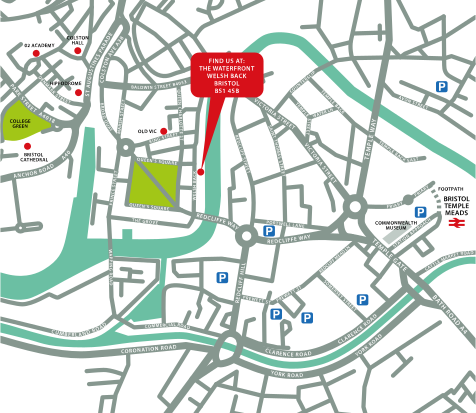
↑ Click the map to view a larger version ↑
-
FileMaker Pro Introduction 2 Days - Upcoming Bristol Course Dates
21 Dec - 22 Dec £495 + vat -
Client Reviews
"Friendly and professional environment, well organised."
Paul Pritchard, Davidoff of London, FileMaker Pro - 2 Day Introduction
"I am extremely happy with the whole process from enquiring to the course delivery. I can't fault my experience and would highly recommend."
Rachel Whitefield, Clarity Copiers, FileMaker Pro Introduction - Two Days
"Thank you for a brilliant course which I found very useful. The trainer was fantastic with excellent knowledge on Filemaker. I would advise anyone to go to XChange Training. "
Alex Cardozo, The Met Police, Bespoke FileMaker Introduction Masterclass
"A thoroughly fun and enjoyable course delivered by an enthusiastic and knowledgeable tutor - can't wait to get back into the office environment and put it all into practice!"
Katrina Gillespie, Vinci Academy, InDesign - 2 Day Advanced
"I can’t thank you enough. The benefit from the training was phenomenal. The textbook handout is something I will be referring back to I'm sure."
Dawn Newman, Olympic Delivery Authority, Illustrator - 2 Day Introduction
"The course was on a one to one basis which was brilliant because it allowed me to follow my own path through it. The tutor was extremely helpful and had an excellent knowledge of the topic. Based on my experience today I would certainly consider using XChange Training again."
Nick Mills, Landmark Information, Captivate - Bespoke 1 Day
"Excellent course that was delivered at a good pace and very easy to understand and apply."
David Cunningham, Animate Introduction - Two Days
"A worthwhile training course. A very experienced instructor who gave useful tips and tricks in addition to the scheduled course."
Andy Hunt, Totem Agency, Maxon Cinema 4D - 2 Day Intermediate
"I really enjoyed the course and found it very informative, the facilities were quiet which was very pleasant and the trainer was extremely knowledgeable. All in all, very good! Thank You! "
Tanja Schlierkamp, Metropolitan Workshop
"The course was very well planned and easy to understand and follow. I feel I have a good knowledge on how to to use HTML and CSS in my role."
Melissa Epsley, ITC, HTML & CSS - 2 Day Introduction
 £495 + vat

Next Dates:
 21 Dec - 22 Dec £495 + vat
Whats Included:
 Your choice of Windows or Mac
  Certified hands-on training
  Small class size (max 4-8)
  6 months post course support
  Digital Learning Materials
  Authorised Course Certificate
Frequently Asked Questions
What are the course times?
For all courses in the London Centre the normal session timings are 10am to 5pm with an hour break for lunch. In addition to the hour lunch break there are also two fifteen minute coffee breaks mid morning and mid afternoon.
Daily times are:
09.45 - Registration
10.00 - Course start
13.00 - Lunch
14.00 - Afternoon starts
17.00 - Course ends
Do you offer discounts
or promotions?
We offer a range of regular discounts available for self funding individuals, charities and education along with period special offers. See our promotions page for full details.
What is provided with this course?
During the course we provide all computers for your use with choice of Windows or Mac, lunch and refreshments along with pads & pens. After the course you will receive the authorised Certificate, quality reference manual and 6 months direct post course support.
Does this course give
a qualification?
Although this course does not provide an actual qualification each delegate is provided with an official Certificate for completion of the course level.
Can you invoice my company?
In short yes we can provide 30 day invoice terms to any UK Limited company with the provision of your official purchase order and/or completing the invoice request for your booking online.

Adobe Design Ready in just 5 days!
Learn Adobe Design skills with our value Adobe Design Masterclass Bundle →