
 0345 363 1130
 info@xchangetraining.co.uk


Adobe InDesign CC Introduction 2 Days - London
Level:
Introduction to Intermediate
Duration:
2
Days - 10am to 5pm
Price:
£395 + vat
Learn the fundamentals of InDesign as we guide you through this comprehensive introduction to the leading desktop-publishing program. We will show you how to create and export attractive, simple documents. This is the perfect starting point for anyone interested in digital publishing.
After we give you a complete tour of the InDesign environment, we will show you how to combine text and graphics to produce output that is ready to use straight away. We will help you add consistency through the use of paragraph and character styles. You will grasp how quick and easy it is to create documents for the web and for print, including how to produce professional PDF files.
Learn the fundamentals of InDesign as we guide you through this comprehensive introduction to the leading desktop-publishing program. We will show you how to create and export attractive, simple documents. This is the perfect starting point for anyone interested in digital publishing.
After we give you a complete tour of the InDesign environment, we will show you how to combine text and graphics to produce output that is ready to use straight away. We will help you add consistency through the use of paragraph and character styles. You will grasp how quick and easy it is to create documents for the web and for print, including how to produce professional PDF files.
-
InDesign Introduction 2 Days
Course Details
This 2-day Introduction course helps you learn about the tools and features available in Adobe InDesign CC. We will help you understand how this industry-leading program takes desktop publishing and design to a new level, and combines production power and creative freedom with tight integration with Photoshop, Illustrator, and Acrobat software. You will learn to create attractive, simple documents and prepare them for the web and for print. We will guide you in learning the work area, working with text and graphics, creating simple vector-based graphics, and the basics of design. You will also learn how to apply consistency to your text through the use of paragraph and character styles.
Creative professionals appreciate the freedom and productivity gains made possible through the use of Adobe InDesign. We will show you how to improve your workflow by harnessing InDesign's integration with other popular Adobe programs.
Upon successful completion of this course, you will be able to:
- Navigate the InDesign environment
- Design documents and save them as Acrobat PDF files
- Add effects to objects
- Apply paragraph and character styles
- Use colours, swatches, and gradients
- Manage transparency and use tables
- Prepare for hand-off to a service provider
Our goal is for you to be able to create simple but professional documents that are ready to use for the web and for print.
Course Target Audience and delegate prerequisites:
This course is intended for graphic designers, creative professionals, print professionals, publishers, pre-press professionals, and marketing communications professionals.
You will need basic PC or Mac skills, including a good understanding of your operating system. You should be able to launch applications, manage files and folders, and save or locate documents confidently.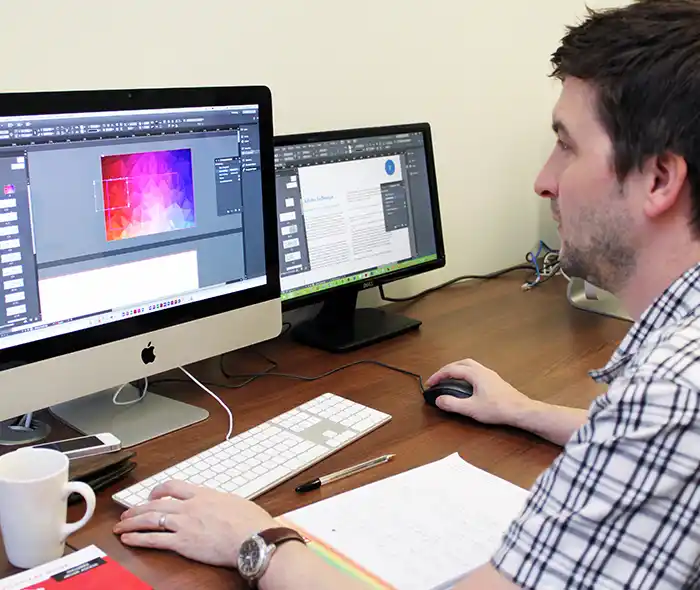
-
Full Course Outline
The following is a general outline. The range of topics covered during your training is dependent upon student level, time available and preferences of your course booking.
Getting started in InDesign- Customise Your Workspace
- Workspace and Window arrangement
- Create a New Document
- Zooming in and out
- Moving around your document
- Using Control panel options
- Previewing your document
- Add Text
- Edit Text using Story Editor
- Spell Check Text
- Find/ Change
- Character formatting options
- Paragraph formatting options
- The Glyphs panel
- Showing Hidden Characters
- Threading Text
- Adding images
- Cropping images
- Resizing images
- Adding Text Wrap
- Understanding different image file types
- Using the Links panel
- Understanding and checking resolution
- Adding colour to Fill/Stroke
- Adding Swatches
- Understanding the difference between CMYK, RGB, Pantone colours
- Creating tint swatches
- Creating Gradients
- Stroke settings
Objects- Creating different shapes
- Arranging, Aligning and Distributing
- Transforming Objects
- Duplicating
- Layers
- Object Styles
- Applying Effects
- Shape and corner options
- Setting up Paragraph Styles
- Setting up Character Styles
- Changing Paragraph & Character styles
- Setting up Parent pages
- Applying a Parent page
- Using Parent pages with facing pages
- Adding page numbers
- Overriding Parent page items
- Using Preflight for basic checks
- Print a Document
- Packaging Files
- Exporting to PDF
-
Location Details
This course is provided at the XChange Training London training centre based at:
5 St John’s Lane
Clerkenwell
London
EC1M 4BHSt John’s Lane is located in the heart of Clerkenwell close to the junction of Farringdon and Clerkenwell Road. Farringdon tube & train station is just a few minutes away and the training centre can also be accessed from Chancery Lane and Barbican tubes in about 10 minutes. There is also easy direct access by bus from Waterloo (243) and West End (55) with nearby stops.
Daily course times run between 10am and 5pm with an hour break for lunch and both mid morning and mid-afternoon refreshment breaks. We recommend arrival at 9.45am for registration on the first day of the course.
View Full details of our London Training Venue and Course options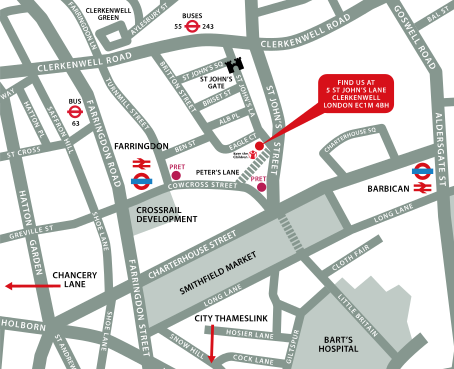
↑ Click the map to view a larger version ↑
View our London Centre Location on Google Maps
-
InDesign Introduction 2 Days - Upcoming London Course Dates
07 Sep - 08 Sep Special Offer! £349 + vat 05 Oct - 06 Oct £395 + vat 26 Oct - 27 Oct £395 + vat 23 Nov - 24 Nov £395 + vat 21 Dec - 22 Dec £395 + vat -
Client Reviews
"Very organized training course covered all the basics needed and ran efficiently and in a nice relaxed and amenable environment."
Amaya Climent, The Crown Estate, InDesign - 1 Day Essentials
"I found the course very enjoyable. After using InDesign for a year just teaching myself how to do things, it is good to now know how to do them properly! Thank you very much."
Justine Rich, Capita, InDesign - 2 Day Introduction
"The trainer was great. I have had many of my questions about Adobe InDesign answered. Thank you for the opportunity to improve my knowledge and make it also an adventage in my professional work for my company."
Marta Jadowska, UBT, InDesign 1 Day Intermediate with ePub
"Thoroughly enjoyed the two day training course. We had a fantastic trainer and the course content was very clear and helpful. Thank you very much."
Ella Luscombe, Kier Construction Southern, Adobe InDesign - Two Day Introduction
"Fantastic two day course on InDesign, well worth doing. Staff very friendly. 10 out of 10"
Daniel Kosta, Icon Productions, InDesign - 2 Day Introduction
"The training content was set at just the right pace. Full of content that we were all able to 'get to grips with' and the trainer was very helpful."
Helen Seddon, ENEHL, InDesign - 2 Day Introduction
"A really informative course with lots of useful hints and tips to use InDesign."
Anisha Patel, AAPG, InDesign - 2 Day Advanced
"An outstanding training course led by a very knowledgeable and insightful tutor. Thoroughly enjoyed my time and will take forward all new knowledge to my workplace and personal life too. Really enjoyed this, thanks very much!"
Emma McLean, University of Strathclyde, Adobe InDesign - Two Day Introduction
"To say that this course has revolutionised my design life is an understatement; It will benefit my work certainly but also several projects currently ongoing in my personal life as I am an aspiring writer and food blogger. Fantastic course delivered by an amazing trainer!"
Lyndsay Stewart, Next, InDesign - Two Day Introduction
"Excellent, answered all of my questions, now familiar with all of the shortcuts and tools I hoped to be familiar with. A great introduction that will save me a lot of time."
Robyn Wyatt, NHS Christie, InDesign - 2 Day Bespoke

Next Dates:
 07 Sep - 08 Sep Special Offer! £349 + vat
05 Oct - 06 Oct £395 + vat
26 Oct - 27 Oct £395 + vat
23 Nov - 24 Nov £395 + vat
21 Dec - 22 Dec £395 + vat
Over 15 years of providing certified Adobe InDesign training courses UK wide

5/5 Stars
I was able to format pages of booklets/posters to a sound level and can use this going forward - worked on text, images, wrap text etc.
18/08/2026
5/5 Stars
Very helpful and informative. Thanks Phil!
18/08/2026
5/5 Stars
Very in depth, great flexibility if we each wanted to know about specific things
13/08/2026
5/5 Stars
Simon is a great trainer with an obvious breadth of knowledge about Adobe Indesign and other products. I have learnt a lot from this course.
13/08/2026
5/5 Stars
As a complete novice with InDesign I was concerned the course would be too advanced for me. Completely the opposite - pace of training was superb with plenty of opportunity to ask questions
11/08/2026
5/5 Stars
It was a great overall explanation in how the app works and the techniques that are most used.
11/08/2026
5/5 Stars
I have learnt lots off of Phill, it has been a great 2 days and i will definitely consider using xchange again.
02/07/2026
5/5 Stars
Alan was a great trainer and very knowledgeable on all things InDesign! He answered all my questions and repeated lots of steps as we went through all training material to ensure we understood. I definitely have a much better understanding of the Indesign application and how to use the tools.
16/06/2026
5/5 Stars
Gave me exactly what I wanted from an introduction to InDesign, a good base knowledge which I can use in my work going forward. I feel much more confident using InDesign now than I did before.
16/06/2026

4/5 Stars
It was very detailed but did not drag and also was completed in good time.
16/06/2026
Whats Included:
 Your choice of Windows or Mac
  Certified hands-on training
  Small class size (max 4-8)
  6 months post course support
  Digital Learning Materials
  Authorised Course Certificate
Frequently Asked Questions
What are the course times?
For all courses in the London Centre the normal session timings are 10am to 5pm with an hour break for lunch. In addition to the hour lunch break there are also two fifteen minute coffee breaks mid morning and mid afternoon.
Daily times are:
09.45 - Registration
10.00 - Course start
13.00 - Lunch
14.00 - Afternoon starts
17.00 - Course ends
Do you offer discounts
or promotions?
We offer a range of regular discounts available for self funding individuals, charities and education along with period special offers. See our promotions page for full details.
What is provided with this course?
During the course we provide all computers for your use with choice of Windows or Mac, lunch and refreshments along with pads & pens. After the course you will receive the authorised Certificate, quality reference manual and 6 months direct post course support.
Does this course give
a qualification?
Although this course does not provide an actual qualification each delegate is provided with an official Certificate for completion of the course level.
Can you invoice my company?
In short yes we can provide 30 day invoice terms to any UK Limited company with the provision of your official purchase order and/or completing the invoice request for your booking online.

Adobe Design Ready in just 5 days!
Learn Adobe Design skills with our value Adobe Design Masterclass Bundle →