
 0345 363 1130
 info@xchangetraining.co.uk


Autodesk 3ds Max Introduction 2 Days - London
Key Course Details:
Level:
Introduction
Duration:
2
Days - 10am to 5pm
Price:
£525 + vat
Learn the fundamentals of 3ds Max as we guide you through this comprehensive introduction to the powerful modelling program. We will show you how to create, import, and manipulate 3D data. With our help, you will quickly learn how to light, animate and render your own 3D objects.
After we give you a complete tour of the 3ds Max environment, we will show you how to import data from other programs and build your own 3D models. As well as enhancing scenes through the use of materials and maps, you will also learn the basics of good scene lighting. With our help, you will be able to animate and render your own 3D creations.
Learn the fundamentals of 3ds Max as we guide you through this comprehensive introduction to the powerful modelling program. We will show you how to create, import, and manipulate 3D data. With our help, you will quickly learn how to light, animate and render your own 3D objects.
After we give you a complete tour of the 3ds Max environment, we will show you how to import data from other programs and build your own 3D models. As well as enhancing scenes through the use of materials and maps, you will also learn the basics of good scene lighting. With our help, you will be able to animate and render your own 3D creations.
-
Autodesk 3ds Max Introduction 2 Days
Course Details
This 2-day Introduction course helps you learn about the tools and features available in Autodesk 3ds Max. We will help you understand how this industry-leading program gives you the tools you need to create and animate your own 3D objects. You will work with materials and maps as we show you how produce well-lit stills and animations.
To aid your continued development, our course encourages self-learning through use of the Autodesk 3ds Max help system. We will show you how to use the help system to improve your understanding of the program long after your course is complete.
Upon successful completion of this course, you will be able to:
- Navigate the 3ds Max environment
- Import data from other 3D programs
- Model 3D objects from 2D shapes
- Embellish scenes by using materials and maps
- Define scene lighting
- Animate objects and materials
- Render still pictures and animations
Our goal is for you to understand how create and animate your own 3D objects.
Course Target Audience and delegate prerequisites:
This course is intended for graphic designers who wish to learn about 3D design and modelling but who have little or no experience of using 3D programs.
You will need basic PC or Mac skills, including a good understanding of your operating system. You should be able to launch applications, manage files and folders, and save or locate documents confidently.
-
Full Course Outline
The following is a general outline. The range of topics covered during your training is dependent upon student level, time available and preferences of your course booking.
Autodesk 3ds Max Overview- Interface & workflow
- Project folder configuration
- Viewports & navigation tools
- Keyboard shortcuts
- Reference coordinate system and Snaps
- Asset browser
- Parametric geometries and shapes
- High and low poly modelling
- Modelling 3D objects from 2D shapes
- Edge copying technique
- Combine multiple modelling concepts to create photo-real models
- Learn to build anything you can imagine
- Scaling your model (reset Xform)
- Xview
- Learn a material’s workflow
- How to use material templates (arch and design and Autodesk materials)
- How to create photorealistic materials
- How to apply a material (uvw map and unwrap uvw)
- Open, save, create & merge materials libraries
- Create & modify cameras
- Create camera from view
- Viewport background
- Scene states
- Isolation mode
- Display object properties
Lighting Your Scene- Standard and photometric lights- advantages & disadvantages
- Distributions types photometric lights
- Self illuminated materials
- Interior lighting techniques
- Daylight system
- Shadow types
- How to animate objects & materials
- Tips & tricks
- Walk through animation
- Select & link objects
- Default scanline renderer
- Mentalray renderer
- Final gather
- Rendering animations with mentalray
- Panorama exporter
- Print size assistant
-
Location Details
This course is provided at the XChange Training London training centre based at:
5 St John’s Lane
Clerkenwell
London
EC1M 4BHSt John’s Lane is located in the heart of Clerkenwell close to the junction of Farringdon and Clerkenwell Road. Farringdon tube & train station is just a few minutes away and the training centre can also be accessed from Chancery Lane and Barbican tubes in about 10 minutes. There is also easy direct access by bus from Waterloo (243) and West End (55) with nearby stops.
Daily course times run between 10am and 5pm with an hour break for lunch and both mid morning and mid-afternoon refreshment breaks. We recommend arrival at 9.45am for registration on the first day of the course.
View Full details of our London Training Venue and Course options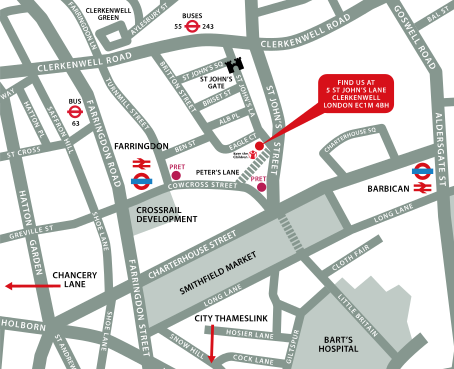
↑ Click the map to view a larger version ↑
View our London Centre Location on Google Maps
-
Autodesk 3ds Max Introduction 2 Days - Upcoming London Course Dates
10 Aug - 11 Aug £525 + vat 26 Oct - 27 Oct £525 + vat -
Client Reviews
"Exactly what I was hoping for, thank you XChange Training!"
Karl Durnberger, Selex, Autodesk 3DS Max - 2 Day Course
"Excellent service and a great place to be trained with superb and well presented facilities. Trainer couldn't have been better - we will definitely invest in another training course."
Ben Ellis, National Lottery, Photoshop - 2 Day Advanced
"The trainer was easy to follow and very easy going, which creates a excellent training environment. I will certainly be coming back in the future. A great teacher and a great course!"
Scott Godfrey, InDesign - 4 Day Masterclass
"An excellent day which achieved my objectives."
Michael Laurie, Arat Consulting, Lightroom - 1 Day Introduction
"The tailored training idea is excellent and I had contact with my instructor beforehand who gave me advice. The facilities are very nice and convenient."
Calliste Lelliott, Friends of the Earth, FileMaker Pro - 2 Day Introduction
"Very informative and fun. The hands on experience is an excellent feature, and being able to start working on what we ultimately hope to produce was very useful."
Paul Nezandonyi, Royal Holloway, QuarkXPress - 2 Day Bespoke
"Excellent course, excellent trainer. Learnt so much. We covered lots of things I had tried to do before with much difficulty. The training made things simple, I will be much more efficient now! "
Laura Millar, FCA, Adobe InDesign - Two Day Introduction
"A very informative day, learnt a lot which I will go back and use in the work place"
Louise Craigie, Hayes Fabrications Ltd, Microsoft Outlook - 1 Day Intermediate
"The instructor was super supporting instructor with an awesome style of imparting the training session! "
Rashmi Maheshwari, Microsoft PowerPoint - 1 Day Advanced
"Great trainer who gave a fantastic insight in a short period of time. I'm looking forward to doing the advanced session!"
Nader Morsy, New College Manchester, InDesign Introduction - 2 Days
 £525 + vat
Next Dates:
 10 Aug - 11 Aug £525 + vat
26 Oct - 27 Oct £525 + vat
Over 15 years of providing certified Autodesk 3ds Max training courses UK wide

5/5 Stars
The 2 day training course was very informative and engaging. There was a lot of really useful techniques that we can take forward in our day to day working. We learnt new skills, such as animation, that was clearly demonstrated and done in a way that was easy to follow along. It was good to ask any specific questions about lighting and material creation that we struggle with or need further help with, and that was answered and explained.
01/10/2024
5/5 Stars
Please note, i unfortunately missed Day 2 of the training, but my co-workers shared their experience and knowledge gained. thanks.
01/10/2024
5/5 Stars
perfect for novice to then start working with software and building knowledge
25/04/2023
5/5 Stars
I was extremely pleased with the training provided to our team. The needs of the group were well managed and content flexed accordingly, the pace of the activity was balanced with plenty of time to understand individual needs. Rod had an excellent manner and was open to questions and discussions around the work and providing possible scenarios and examples to deepen knowledge where needed.
17/02/2023
5/5 Stars
It's quite intensive but enjoyable, Ricardo was very good. Would have appreciated a voucher for somewhere other than Sainsbury's given variety of local outlets available (e.g. Nando, Byron...) Otherwise, very much impressed and would use Xchange again.
28/04/2022

4/5 Stars
Great training, very useful for my work.
28/04/2022
5/5 Stars
My 3D Max experience started quite badly but turned up being incredibly easy, fun and relaxing. I want to thank Chris for his great help in managing the situation with such speed, professionality and understanding. And a massive thank you to Rod for his incredible help sorting out gaps and insecurities caused from the previous experience. Anyway, I will probably need a more advance course in the future, as my work schedules will require me to start creating more complex renders over the next 6 months. Will see, not completely sure yet.
19/01/2022
5/5 Stars
Ricardo was extremely knowledgeable and helpful, worked to my speed and even included some extra useful tips when working with other software. The building is lovely with a great location for easy access from surrounding areas. The lunch vouchers are a great added extra! Will definitely be booking again. Many thanks!
21/08/2020
4/5 Stars
Great tutor, covered many basics of Vray rendering. Reality is that I now need to practise lots to gain confidence in what was taught. As a tip fr future training, I think it would be useful to follow up the training courses with recommended video links for further learning or detailed notes of the tips and techniques covered. Appreciate each course is adapted for the specific needs of an individual or business but a general learning manual covering off the basics would be useful.
17/03/2020
5/5 Stars
Rod was excellent; very knowledgeable, friendly and was able to pass on that knowledge effectively.
24/04/2019
Whats Included:
 Your choice of Windows or Mac
  Certified hands-on training
  Small class size (max 4-8)
  6 months post course support
  Digital Learning Materials
  Authorised Course Certificate
Frequently Asked Questions
What are the course times?
For all courses in the London Centre the normal session timings are 10am to 5pm with an hour break for lunch. In addition to the hour lunch break there are also two fifteen minute coffee breaks mid morning and mid afternoon.
Daily times are:
09.45 - Registration
10.00 - Course start
13.00 - Lunch
14.00 - Afternoon starts
17.00 - Course ends
Do you offer discounts
or promotions?
We offer a range of regular discounts available for self funding individuals, charities and education along with period special offers. See our promotions page for full details.
What is provided with this course?
During the course we provide all computers for your use with choice of Windows or Mac, lunch and refreshments along with pads & pens. After the course you will receive the authorised Certificate, quality reference manual and 6 months direct post course support.
Does this course give
a qualification?
Although this course does not provide an actual qualification each delegate is provided with an official Certificate for completion of the course level.
Can you invoice my company?
In short yes we can provide 30 day invoice terms to any UK Limited company with the provision of your official purchase order and/or completing the invoice request for your booking online.

Adobe Design Ready in just 5 days!
Learn Adobe Design skills with our value Adobe Design Masterclass Bundle →