
 0345 363 1130
 info@xchangetraining.co.uk


DaVinci Resolve Editing Introduction 2 Days - London
Level:
Introduction
Duration:
2
Days - 10am to 5pm
Price:
£495 + vat
Learn the fundamentals of Editing with DaVinci Resolve on this comprehensive introduction to the leading video-editing and colour grading program. We will show you how to use the powerful professional non-linear editing tools to increase the flexibility of your video workflow.
After we give you the complete tour of Resolve’s powerful features for advanced editing we will familiarise you further with the interface and show you how to perform basic editing functions. Our course will teach you to edit and mark clips, add titles, work with transitions, mix sound and apply filters. Get the skills to use Resolve’s timeline tools for more creative and faster professional editing.
Learn the fundamentals of Editing with DaVinci Resolve on this comprehensive introduction to the leading video-editing and colour grading program. We will show you how to use the powerful professional non-linear editing tools to increase the flexibility of your video workflow.
After we give you the complete tour of Resolve’s powerful features for advanced editing we will familiarise you further with the interface and show you how to perform basic editing functions. Our course will teach you to edit and mark clips, add titles, work with transitions, mix sound and apply filters. Get the skills to use Resolve’s timeline tools for more creative and faster professional editing.
-
DaVinci Resolve Editing Introduction 2 Days
Course Details
This course is for new users of Blackmagic Design’s DaVinci Resolve. It is designed for those people who wish to learn video editing in this premium level video editing and colour grading application.
DaVinci Resolve combines professional non-linear video editing with the world’s most advanced colour corrector so now you can edit, colour correct, finish and deliver all from one system.
Course Target Audience and delegate prerequisites:
As this is a level 1 course all you will need to have are basic computer skills such as using text editors, email applications etc. and a desire to use video creatively. It is advised (although not essential) that you complete this editing course prior to going onto the colour grading course.
DaVinci Resolve is a powerful application and therefore you should ensure that you have a reasonably powerful computer that will meet the needs of the editing you wish to do after the course. This includes ideally having a quad core processor, 16G of RAM and a GPU (Graphics card with at least 1.5 – 2G of video RAM).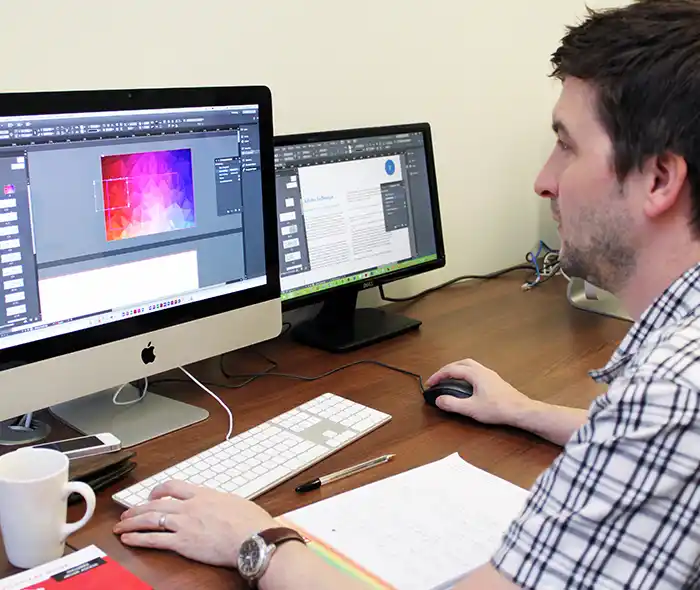
-
Full Course Outline
The following is a general outline. The range of topics covered during your training is dependent upon student level, time available and preferences of your course booking.
- Overview of the Resolve UI
- Creating, importing and managing projects
- Configuring important project settings
- Importing, organising, sorting and searching media/metadata
- Bins, Smart Bins & Power Bins
- Selecting which parts of the media to use
- Subclips
- Creating timelines
- Building rough-cuts
- Optimising Resolves performance
- Refining your edit with the editing tools
- Putting clips in motion
- Multicam editing
- Pan and Scan with Dynamic Zoom
- Importing timelines from other applications (Conforming)
- Creating titles
- Transitions
- Playing with time
- Working with Audio
- Archiving your projects and backing up your work
- Export options
- A brief look at the colour page
- Overview of premium features not in the free version
-
Location Details
This course is provided at the XChange Training London training centre based at:
5 St John’s Lane
Clerkenwell
London
EC1M 4BHSt John’s Lane is located in the heart of Clerkenwell close to the junction of Farringdon and Clerkenwell Road. Farringdon tube & train station is just a few minutes away and the training centre can also be accessed from Chancery Lane and Barbican tubes in about 10 minutes. There is also easy direct access by bus from Waterloo (243) and West End (55) with nearby stops.
Daily course times run between 10am and 5pm with an hour break for lunch and both mid morning and mid-afternoon refreshment breaks. We recommend arrival at 9.45am for registration on the first day of the course.
View Full details of our London Training Venue and Course options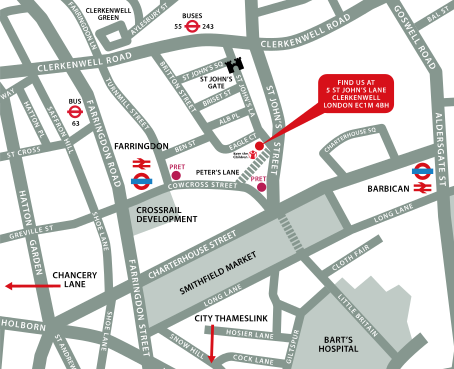
↑ Click the map to view a larger version ↑
View our London Centre Location on Google Maps
-
DaVinci Resolve Editing Introduction 2 Days - Upcoming London Course Dates
23 Nov - 24 Nov £495 + vat 08 Feb - 09 Feb £495 + vat 26 Apr - 27 Apr £495 + vat 28 Jun - 29 Jun £495 + vat -
Client Reviews
"The course was cohesive and well prepared. Thank you!"
Tina Gonzalez, Edinburgh Napier University, DaVinci Resolve - Two Day Introduction
"Really informative and useful training, I learnt so much about DaVinci Resolve within just 2 days. This training course has now really given me the confidence to use this software more efficiently."
Emma Pink, Guys & St Thomas NHS Trust, DaVinci Resolve Editing - 2 Day Introduction
"Thanks very much for such a good course. It was thoroughly enjoyable and I learned a lot. XChange Training were very accommodating to our needs."
Tim Clough, The Savoy, Mac OS X & iOS Introduction
"Very good content and the trainer was very enthusiastic."
Bruce James, City & Guilds, Microsoft Project - 1 Day Intermediate
"Great general overview giving me an excellent insight into the crazy world of Photoshop!"
Nic Griffiths, Getty Images, Photoshop - 2 Day Introduction
"This is my third class, they have all been excellent. Earning my Adobe Illustrator qualification with you has made a big difference in my job hunting. Thank you."
Velo Mitrovich, Illustrator - 1 Day Introduction
"I was first sceptical of this course, with regards to the knowledge I would gain in such a short time, but having taken this course, I could not have been happier. The tutor was fantastic, very knowledgable and helpful. I would not only recommend XChange training but would consider doing further courses myself. "
Gary Carney, none, HTML & CSS - 2 Day Introduction
"It was very good, thoroughly worth it. The tutor was excellent and very efficient. "
William Slack, Student, Vectorworks - 2 Day Introduction
"The trainer was easy to follow and very easy going, which creates a excellent training environment. I will certainly be coming back in the future. A great teacher and a great course!"
Scott Godfrey, InDesign - 4 Day Masterclass
"Very pleased with the well-planned course."
Rachel Willsher, SPG Media, Web Combo - 4 Day Masterclass
 £495 + vat
Next Dates:
 23 Nov - 24 Nov £495 + vat
08 Feb - 09 Feb £495 + vat
26 Apr - 27 Apr £495 + vat
28 Jun - 29 Jun £495 + vat
Over 15 years of providing certified Davinci Resolve training courses UK wide

5/5 Stars
I thought the course provided a solid overview of the colour workflow elements of the software. Shailesh presented everything in a way that was easy to follow and was very accommodating with answering questions as they arose. I feel more confident in my knowledge of the software, the various different tools and techniques that can be used to achieve similar results and the colour grading workflow in general.
16/10/2025

4/5 Stars
The trainer was absolutely wonderful, super helpful and knowledgeable and was tailored the course to us which I found extremely beneficial. We were able to ask questions and mould the training around our own needs, which I feel helped us get the most out of it.
12/08/2025
5/5 Stars
Course was so thorough! The instructor clearly very knowledgeable and able to advise on specific workflow requirements!
12/08/2025
4/5 Stars
Lots of info but at times trainer was too quick, could barely keep up. Will need lots f practice at home, but overall a very good introduction to the software.
24/06/2025
5/5 Stars
Good course, quite a lot to take in for the Colour Grading vs the Editing. Colour Grading is quite complex and perhaps should focus more on the Auto Functions initially then go more to the individual colour grading.
17/04/2025
5/5 Stars
Very well run.
15/04/2025
5/5 Stars
Great started course for DaVinci
15/04/2025
5/5 Stars
A good course with a suitable step-by-step approach to take a complete novice at the software and be able to produce usable videos.
15/04/2025
5/5 Stars
Great. the instructor had loads of time and patience with us being able to answer questions and cater to our needs
20/02/2025
5/5 Stars
Obviously, there is so much to take in and learn that it would be great to make this a 3 day course to enable us to take our time a bit more and include some more exercises.
20/02/2025
Whats Included:
 Your choice of Windows or Mac
  Certified hands-on training
  Small class size (max 4-8)
  6 months post course support
  Digital Learning Materials
  Authorised Course Certificate
Frequently Asked Questions
What are the course times?
For all courses in the London Centre the normal session timings are 10am to 5pm with an hour break for lunch. In addition to the hour lunch break there are also two fifteen minute coffee breaks mid morning and mid afternoon.
Daily times are:
09.45 - Registration
10.00 - Course start
13.00 - Lunch
14.00 - Afternoon starts
17.00 - Course ends
Do you offer discounts
or promotions?
We offer a range of regular discounts available for self funding individuals, charities and education along with period special offers. See our promotions page for full details.
What is provided with this course?
During the course we provide all computers for your use with choice of Windows or Mac, lunch and refreshments along with pads & pens. After the course you will receive the authorised Certificate, quality reference manual and 6 months direct post course support.
Does this course give
a qualification?
Although this course does not provide an actual qualification each delegate is provided with an official Certificate for completion of the course level.
Can you invoice my company?
In short yes we can provide 30 day invoice terms to any UK Limited company with the provision of your official purchase order and/or completing the invoice request for your booking online.

Adobe Design Ready in just 5 days!
Learn Adobe Design skills with our value Adobe Design Masterclass Bundle →