
 0345 363 1130
 info@xchangetraining.co.uk


DaVinci Resolve Editing & Colour Introduction Masterclass 4 Days - Manchester
Level:
Introduction
Duration:
4
Days - 10am to 5pm
Price:
£895 + vat
Learn the fundamentals of both editing and colour correction with DaVinci Resolve on this comprehensive introduction Masterclass to the leading video-editing and colour grading program. We will show you how to use the powerful professional tools for non-linear editing and advanced colour correction to increase the flexibility of your video workflow.
After we give you the complete tour of Resolve’s powerful features for both advanced editing and colour correction we will familiarise you further with the interface and show you how to perform basic editing and colour grading functions. Our masterclass will help you get to grips with the key Davinci Resolve tools used by video professionals across the world. This combined masterclass course is ideal if you are new to Resolve and want to benefit from the advanced features for editing and colour correction to boost your creativity and speed video projects.
Learn the fundamentals of both editing and colour correction with DaVinci Resolve on this comprehensive introduction Masterclass to the leading video-editing and colour grading program. We will show you how to use the powerful professional tools for non-linear editing and advanced colour correction to increase the flexibility of your video workflow.
After we give you the complete tour of Resolve’s powerful features for both advanced editing and colour correction we will familiarise you further with the interface and show you how to perform basic editing and colour grading functions. Our masterclass will help you get to grips with the key Davinci Resolve tools used by video professionals across the world. This combined masterclass course is ideal if you are new to Resolve and want to benefit from the advanced features for editing and colour correction to boost your creativity and speed video projects.
-
DaVinci Resolve Introduction Masterclass 4 Days
Course Details
This course is for new users of Blackmagic Design’s DaVinci Resolve. It is designed for those people who wish to learn video editing in this premium level video editing and colour grading application.
DaVinci Resolve combines professional non-linear video editing with the world’s most advanced colour corrector so now you can edit, colour correct, finish and deliver all from one system.
This course can be taken in a single 4-day block or split into a 2-day block (Editing) and then a separate 2-day block (Colour Correction) taken at a later date.
Course Target Audience and delegate prerequisites:
As this is a level 1 course all you will need to have are basic computer skills such as using text editors, email applications etc. and a desire to use video creatively. It is advised (although not essential) that you complete this editing course prior to going onto the colour grading course.
DaVinci Resolve is a powerful application and therefore you should ensure that you have a reasonably powerful computer that will meet the needs of the editing you wish to do after the course. This includes ideally having a quad core processor, 16G of RAM and a GPU (Graphics card with at least 1.5 – 2G of video RAM).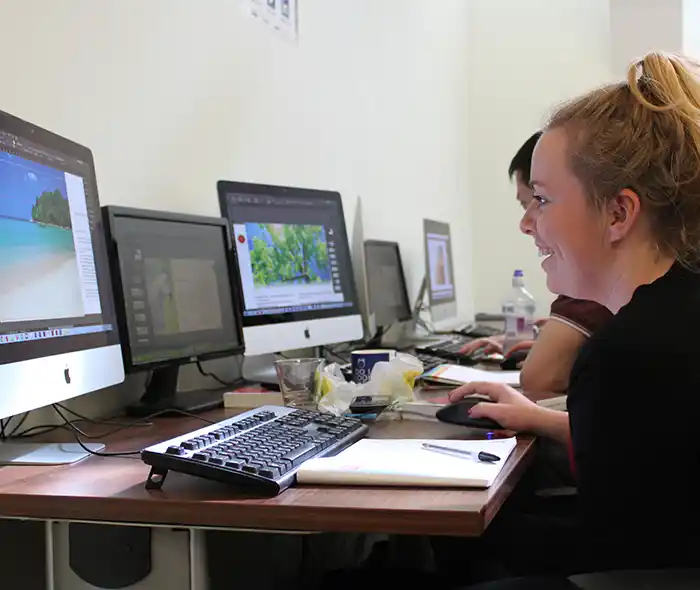
-
Full Course Outline
The following is a general outline. The range of topics covered during your training is dependent upon student level, time available and preferences of your course booking.
- Overview of the Resolve Editing UI
- Creating, importing and managing projects
- Configuring important project settings
- Importing, organising, sorting and searching media/metadata
- Bins, Smart Bins & Power Bins
- Selecting which parts of the media to use
- Subclips
- Creating timelines
- Building rough-cuts
- Optimising Resolves performance
- Refining your edit with the editing tools
- Putting clips in motion
- Multicam editing
- Pan and Scan with Dynamic Zoom
- Importing timelines from other applications (Conforming)
- Creating titles
- Transitions
- Playing with time
- Working with Audio
- Archiving your projects and backing up your work
- Export options
- A brief look at the colour page
- Overview of premium features not in the free version
- Overview of the Resolve Grading UI
- Creating, importing and managing projects
- Configuring important project settings
- Bins, Smart Bins & Power Bins
- Importing and linking projects – conforming
- Scene detection
- A brief look at the edit page
- Filtering your timelines – metadata
- Colour management options
- What environment and equipment do you need to produce a consistent grade?
- Optimising Resolves performance
- Balancing your shots with primary tools
- Understanding the video scopes
- Understanding and using ‘nodes’
- Creating and using ‘versions’
- Creating and using ‘stills’
- Understanding how ‘shot match’ works and when to use it
- PowerGrades
- Lightbox
- Blur and Sharpen
- Creative Black & White
- Secondary grading – Qualifiers
- Power windows
- Tracking – cloud, point, FX, Clip & Frame
- Resolve FX
- Burn-ins
- Archiving your projects and backing up your work
- Export options
- Overview of premium features not in the free version
-
Location Details
This course is provided at the XChange Training Manchester training centre based at:
Piccadilly House
49 Piccadilly
Manchester
M1 2APPiccadilly House is located in the heart of Manchester directly next to the Piccadilly Gardens transport interchange with excellent bus and tram connections and is easily accessed from Piccadilly train Station (5 mins). Victoria station is also close by (around 10 mins).
Daily course times run between 10am and 5pm with an hour break for lunch and both mid morning and mid-afternoon refreshment breaks. We recommend arrival at 9.45am for registration on the first day of the course.
View Full details of our Manchester Training Venue and Course options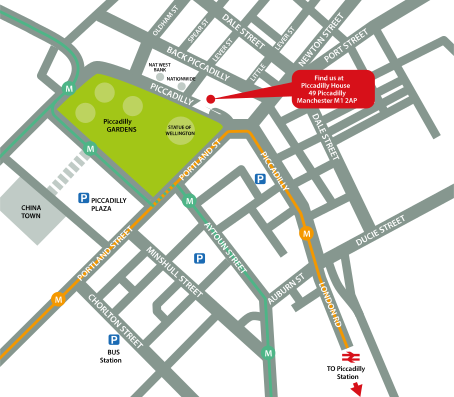
↑ Click the map to view a larger version ↑
View our Manchester Centre Location on Google Maps
-
DaVinci Resolve Introduction Masterclass 4 Days - Upcoming Manchester Course Dates
23 Nov - 26 Nov £895 + vat 08 Feb - 11 Feb £895 + vat 26 Apr - 29 Apr £895 + vat 28 Jun - 01 Jul £895 + vat DaVinci Resolve Introduction Masterclass 4 Days - Split Date Options
DaVinci Resolve Editing Introduction
23 Nov - 24 Nov
8 Feb - 9 Feb
26 Apr - 27 Apr
28 Jun - 29 Jun
DaVinci Resolve Colour Introduction
25 Nov - 26 Nov
10 Feb - 11 Feb
28 Apr - 29 Apr
30 Jun - 1 Jul
-
Client Reviews
"Really informative and useful training, I learnt so much about DaVinci Resolve within just 2 days. This training course has now really given me the confidence to use this software more efficiently."
Emma Pink, Guys & St Thomas NHS Trust, DaVinci Resolve Editing - 2 Day Introduction
"The course was cohesive and well prepared. Thank you!"
Tina Gonzalez, Edinburgh Napier University, DaVinci Resolve - Two Day Introduction
"The instructor was very engaging & helpful with good experience of the software / material. The facilities and equipment was also great. Very good course overall."
Cliff da Silva, Standard Bank Jersey, Adobe LiveCycle PDF Creation - One Day
"Great training course, extremely happy with the content covered and learnt. Now have a clear understanding on the basics of HTML and CSS, would definitely use XChange Training again."
Alex Ottley, TM Lewin, HTML & CSS - 1 Day Bespoke
"Very Good, All my questions were answered and I had a comprehensive introduction to Cinema4D. I will be coming back for the intermediate and advanced course along with an After Effects course."
Fraser Crick, Estee Lauder, Cinema 4D - 2 Day Introduction
"Well paced. I would recommend the course for anyone who is starting with WordPress"
Bob King, Department of Health, WordPress - 2 Day Introduction
"Really great training, very informative trainer who knows the programme really well. All bases covered. Thanks very much!"
Lauren Hooper, ISG, Edge - 1 Day Introduction
"Had a very interesting 2 days within pleasant surroundings with a friendly, knowledgeable instructor. Perfect C4D training course."
Darren Mael, Billington Cartmell, Maxon Cinema 4D - 2 Day Intermediate
"I found this course to be extremely helpful. I now feel like I have a lot more confidence using the software and have a much better knowledge."
Abi Griffin, 2 Day Illustrator Advanced
"Have thoroughly enjoyed attending the photoshop training course. The instructor was extremely helpful, friendly and knowledgable. I have gained lots of useful hints, tips and techniques to help me. Will happily recommend to others. Thank you."
Michaela Dixon, Motor Mart Ltd, Photoshop - 1 Day Introduction
 £895 + vat
Next Dates:
 23 Nov - 26 Nov £895 + vat
08 Feb - 11 Feb £895 + vat
26 Apr - 29 Apr £895 + vat
28 Jun - 01 Jul £895 + vat
Split Course Date Options:
DaVinci Resolve Editing Introduction
23 Nov - 24 Nov
8 Feb - 9 Feb
26 Apr - 27 Apr
28 Jun - 29 Jun
DaVinci Resolve Colour Introduction
25 Nov - 26 Nov
10 Feb - 11 Feb
28 Apr - 29 Apr
30 Jun - 1 Jul
Over 15 years of providing certified Davinci Resolve training courses UK wide

5/5 Stars
I thought the course provided a solid overview of the colour workflow elements of the software. Shailesh presented everything in a way that was easy to follow and was very accommodating with answering questions as they arose. I feel more confident in my knowledge of the software, the various different tools and techniques that can be used to achieve similar results and the colour grading workflow in general.
16/10/2025

4/5 Stars
The trainer was absolutely wonderful, super helpful and knowledgeable and was tailored the course to us which I found extremely beneficial. We were able to ask questions and mould the training around our own needs, which I feel helped us get the most out of it.
12/08/2025
5/5 Stars
Course was so thorough! The instructor clearly very knowledgeable and able to advise on specific workflow requirements!
12/08/2025
4/5 Stars
Lots of info but at times trainer was too quick, could barely keep up. Will need lots f practice at home, but overall a very good introduction to the software.
24/06/2025
5/5 Stars
Good course, quite a lot to take in for the Colour Grading vs the Editing. Colour Grading is quite complex and perhaps should focus more on the Auto Functions initially then go more to the individual colour grading.
17/04/2025
5/5 Stars
Very well run.
15/04/2025
5/5 Stars
Great started course for DaVinci
15/04/2025
5/5 Stars
A good course with a suitable step-by-step approach to take a complete novice at the software and be able to produce usable videos.
15/04/2025
5/5 Stars
Great. the instructor had loads of time and patience with us being able to answer questions and cater to our needs
20/02/2025
5/5 Stars
Obviously, there is so much to take in and learn that it would be great to make this a 3 day course to enable us to take our time a bit more and include some more exercises.
20/02/2025
Whats Included:
 Your choice of Windows or Mac
  Certified hands-on training
  Small class size (max 4-8)
  6 months post course support
  Digital Learning Materials
  Authorised Course Certificate
Frequently Asked Questions
What are the course times?
For all courses in the Manchester Centre the normal session timings are 10am to 5pm with an hour break for lunch. In addition to the hour lunch break there are also two fifteen minute coffee breaks mid morning and mid afternoon.
Daily times are:
09.45 - Registration
10.00 - Course start
13.00 - Lunch
14.00 - Afternoon starts
17.00 - Course ends
Do you offer discounts
or promotions?
We offer a range of regular discounts available for self funding individuals, charities and education along with period special offers. See our promotions page for full details.
What is provided with this course?
During the course we provide all computers for your use with choice of Windows or Mac, lunch and refreshments along with pads & pens. After the course you will receive the authorised Certificate, quality reference manual and 6 months direct post course support.
Does this course give
a qualification?
Although this course does not provide an actual qualification each delegate is provided with an official Certificate for completion of the course level.
Can you invoice my company?
In short yes we can provide 30 day invoice terms to any UK Limited company with the provision of your official purchase order and/or completing the invoice request for your booking online.

Adobe Design Ready in just 5 days!
Learn Adobe Design skills with our value Adobe Design Masterclass Bundle →