
 0345 363 1130
 info@xchangetraining.co.uk


Adobe Photoshop CS6 Introduction Masterclass with ACP Exam 5 Days - Manchester
Level:
Introduction to Advanced
Duration:
5
Days - 10am to 5pm
Price:
£995 + vat
Go from being a novice to mastering the advanced tasks in the leading image-manipulation program. Join us as we show you how to take charge and become a Photoshop power user. Get the know-how you need on photo retouching and much more. Pass the ACP exam and get qualified!
We will guide you on everything from getting started by making simple adjustments and controlling the Photoshop environment all the way up to applying advanced techniques for retouching photos. With our help, you will become confident in using the program's advanced features to produce visual compositions that stand out. You will end the course by testing your skills in the ACP exam.
Go from being a novice to mastering the advanced tasks in the leading image-manipulation program. Join us as we show you how to take charge and become a Photoshop power user. Get the know-how you need on photo retouching and much more. Pass the ACP exam and get qualified!
We will guide you on everything from getting started by making simple adjustments and controlling the Photoshop environment all the way up to applying advanced techniques for retouching photos. With our help, you will become confident in using the program's advanced features to produce visual compositions that stand out. You will end the course by testing your skills in the ACP exam.
-
Photoshop ACP Masterclass 5 Days
Course Details
This 5-day Masterclass course helps you learn about the tools and features available for power users of Adobe Photoshop. We will help you understand how this industry-leading program takes image manipulation to a new level. We will guide you in learning the work area and making basic adjustments, moving on to more advanced topics such as facial retouching, creating brushes and patterns, and the automation of workflows.
Upon successful completion of this course, you will be able to:
- Navigate the Photoshop environment
- Select parts of an image in several ways
- Enhance images by using Adjustment Layers, Smart Sharpen and content-aware tools
- Understand tools used for painting and retouching images
- Adjust the contrast and brightness of your artwork
- Fill areas with colour and gradients
- Blend images to create simple compositions
- Resize images for the web and for print
- Add, adjust and style both text and layers
- Warp images and apply other special effects
- Integrate your workflow with Adobe Bridge
- Output artwork for the web
- Prepare images for print
- Apply advanced facial retouching and manipulation techniques
- Handle and adjust photos in Camera Raw format
- Customise and create brushes and patterns
- Mask and lock parts of an image
- Automate your workflow with other Creative Suite programs
The final day of the course is dedicated to the Adobe Certified Professional (ACP) Photoshop exam, including trying a mock exam, reviewing answers, and then taking the real exam. The ACP exam represents an official qualification, and you will be provided with an instant pass or fail result. We are confident that you will join everyone we have already helped to pass the exam and collect an official certificate of Adobe Certified Professional status.
As well as giving you the opportunity to take the ACP exam, this course is the perfect preparation if you plan to take the Adobe Certified Expert (ACE) exam.
Our goals are for you to be able to apply a wide range of image adjustments, to understand the advanced features of Photoshop, to become a confident power user, and to leave with an ACP qualification under your belt.
This course can be taken in a single 5-day block or split into a 2-day block (Introduction) and then a separate 3-day block (Advanced plus ACP exam) taken at a later date.
Course Target Audience and delegate prerequisites:
This course is intended for digital artists and photographers as well as those who work for advertising agencies, design agencies, marketing agencies, production houses, and specialist corporate departments.
You will need basic PC or Mac skills, including a good understanding of your operating system. You should be able to launch applications, manage files and folders, and save or locate documents confidently.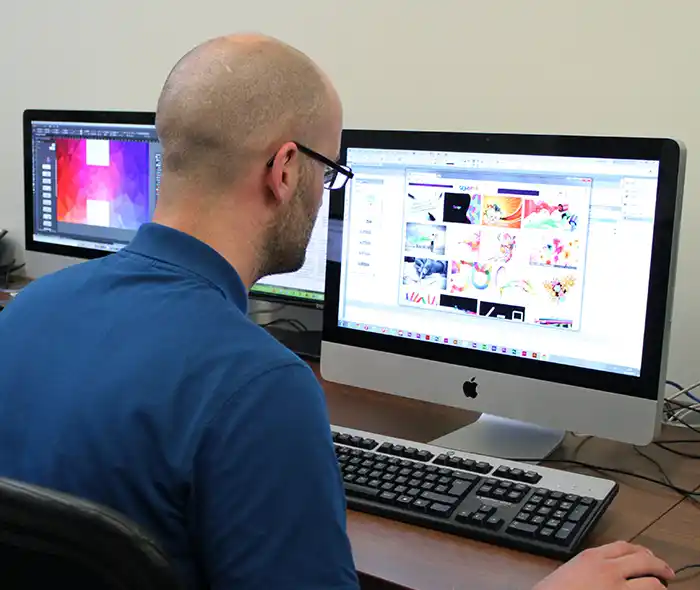
-
Full Course Outline
The following is a general outline. The range of topics covered during your training is dependent upon student level, time available and preferences of your course booking.
-
Location Details
This course is provided at the XChange Training Manchester training centre based at:
Piccadilly House
49 Piccadilly
Manchester
M1 2APPiccadilly House is located in the heart of Manchester directly next to the Piccadilly Gardens transport interchange with excellent bus and tram connections and is easily accessed from Piccadilly train Station (5 mins). Victoria station is also close by (around 10 mins).
Daily course times run between 10am and 5pm with an hour break for lunch and both mid morning and mid-afternoon refreshment breaks. We recommend arrival at 9.45am for registration on the first day of the course.
View Full details of our Manchester Training Venue and Course options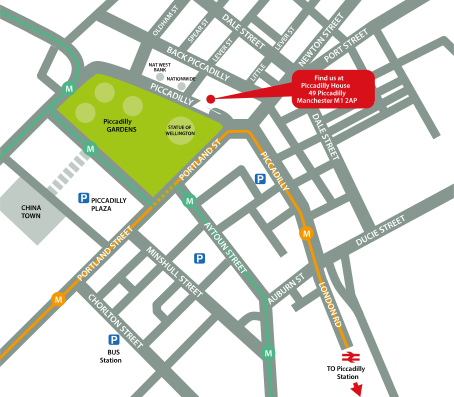
↑ Click the map to view a larger version ↑
View our Manchester Centre Location on Google Maps
-
Photoshop CS6 ACP Masterclass 5 Days - Upcoming Manchester Course Dates
Photoshop CS6 ACP Masterclass 5 Days - Split Date Options
Photoshop Introduction
Photoshop Advanced
-
Client Reviews
"Very Informative and useful. Great insight into Photoshop and its commercial uses at work. Excellent location and trainer."
Shane O’Byrne, MEC Global, Photoshop - 2 Day Introduction
"Good basic introduction to Photoshop but included some advanced elements that could be expanded on with further reading/training."
Karen Hartley, J Murphy & Sons, Photoshop - 2 Day Introduction
"It was a good starting point to learn about Photoshop and was a good relaxed informal class."
Melanie Day, Parker Hannifin, Photoshop - 2 Day Introduction
"I thought the training was excellent and was impressed by the knowledge of the instructor. I also found the adaptability to teach on images I brought with me extremely helpful. Many thanks!"
Keith Baker, Science Press Ltd, Photoshop - 2 Day Introduction
"Good pace and broad spectrum of basics covered, along with some harder content. Instructor was friendly, direct and highly knowledgeable. Not a pressured environment, very useful."
Jennifer Brough, Chartered Insurance Institute, Photoshop - 1 Day Introduction
"Very good course, learned a lot that I can apply straight away."
Gary McCall, Getty Images, Photoshop - 2 Day Introduction
"An excellent introduction to Photoshop - well paced, informative and the tutor was very attentive to our needs. "
Hayley Gelling, Production Guild, Photoshop Essentials - 1 Day
"The course was extremely useful and I really enjoyed it! The trainer was great and I hope to put it all into good practice."
Sarah Frandsen, Wimbledon Tennis Championships, Photoshop - 2 Day Introduction
"The trainer had an excellent knowledge of product and how to apply things in a day to day situation."
Faye Purver, Mi-Case, Photoshop - 2 Day Introduction
"The instructor was clearly knowledgeable of their subject. Pacing was good and the content was applied to the different backgrounds of the people who were present. All staff were courteous - good facilities."
Bruce Fleming, Central Park Primary School, Photoshop - 2 Day Advanced
Over 15 years of providing certified Adobe Photoshop training courses UK wide

5/5 Stars
Donna was fantastic, and tailored the course to our every need. I feel well equipped to go forth and experiment with Photoshop now! Thank you for much.
16/10/2026
5/5 Stars
The course was great at welcoming me to Photoshop which can often feel very scary to look at. I now feel I can take on the basics learnt and build up my skills which I feel really excited to do! Relaxed training with the ability to ask questions, great to be provided with all the tech plus notepads, pens and Sainsbury's vouchers. Thanks!
16/10/2026
5/5 Stars
Donna was really great and I feel a lot more confident using Photoshop going forward.
16/10/2026

4/5 Stars
I felt that the course was full of useful information that I will be able to use in my role. The instructor was deeply knowledgeable about Photoshop and it was clear he has a passion for it. There were times when I felt we spent too long on a topic (such as filters, which I probably will not use in my job, or file types). However, I understand that other delegates may find these more useful and may have needed additional time with them. It would have been good to do more hands-on independent photoshop work while having the instructor there to give feedback.
12/08/2026
5/5 Stars
A very useful course which was tailored to the work I do. The trainer was friendly and patient, ensuring I understood everything before moving on. Thank you!
27/07/2026
5/5 Stars
Was really informative and Doug was extremely helpful and friendly. Answered all my questions. Feel like I learnt everything I wanted to and excited to take away to use these new skills into my job.
14/05/2026
5/5 Stars
A lot of new information and as someone who is really new to the industry, at times was a little overwhelming; however I found Doug really patient and understanding.
14/05/2026
5/5 Stars
Thank you very much for this course on Photoshop, I already knew a little bit about the application, but after this course, I feel much more confident in a lot of the areas in Photoshop, there were a lot of tools and shortcuts that I wasn't aware of. Now I feel confident enough in my knowledge to work on Company collateral.
14/05/2026
5/5 Stars
really friendly
02/04/2026
5/5 Stars
I found it very easy to follow Doug but I found it hard to write notes and practice the techniques too. I have lots to experiment with though at home and with colleagues at work
12/03/2026
Whats Included:
 Your choice of Windows or Mac
  Certified hands-on training
  Small class size (max 4-8)
  6 months post course support
  Digital Learning Materials
  Authorised Course Certificate
Frequently Asked Questions
What are the course times?
For all courses in the Manchester Centre the normal session timings are 10am to 5pm with an hour break for lunch. In addition to the hour lunch break there are also two fifteen minute coffee breaks mid morning and mid afternoon.
Daily times are:
09.45 - Registration
10.00 - Course start
13.00 - Lunch
14.00 - Afternoon starts
17.00 - Course ends
Do you offer discounts
or promotions?
We offer a range of regular discounts available for self funding individuals, charities and education along with period special offers. See our promotions page for full details.
What is provided with this course?
During the course we provide all computers for your use with choice of Windows or Mac, lunch and refreshments along with pads & pens. After the course you will receive the authorised Certificate, quality reference manual and 6 months direct post course support.
Does this course give
a qualification?
Yes this course provides you with an official recognised qualification which is the Adobe Certified Professional gained by passing the exam at the end of the course.
Can you invoice my company?
In short yes we can provide 30 day invoice terms to any UK Limited company with the provision of your official purchase order and/or completing the invoice request for your booking online.

Adobe Design Ready in just 5 days!
Learn Adobe Design skills with our value Adobe Design Masterclass Bundle →