
 0345 363 1130
 info@xchangetraining.co.uk


Canva Intermediate 1 Day - London
Level:
Intermediate
Duration:
1
Day - 10am to 5pm
Price:
£295 + vat
Build on your existing Canva skills with our 1-day Intermediate Canva course, ideal for anyone ready to move beyond the basics. This practical session helps you develop greater creative control, exploring advanced tools and techniques to produce more polished professional designs. You’ll learn how to work more efficiently, refine your visual style and create stronger graphics, presentations, videos and documents.
Expanding on what you already know, the course introduces features such as Brand Kits, AI tools, Whiteboards, enhanced photo editing and more dynamic animation. You’ll also explore collaborative workflows, Canva’s app integrations and best practices for preparing content for print, web and interactive use. By the end of the day, you’ll be able to create high-quality, consistent content with greater confidence and creativity.
Build on your existing Canva skills with our 1-day Intermediate Canva course, ideal for anyone ready to move beyond the basics. This practical session helps you develop greater creative control, exploring advanced tools and techniques to produce more polished professional designs. You’ll learn how to work more efficiently, refine your visual style and create stronger graphics, presentations, videos and documents.
Expanding on what you already know, the course introduces features such as Brand Kits, AI tools, Whiteboards, enhanced photo editing and more dynamic animation. You’ll also explore collaborative workflows, Canva’s app integrations and best practices for preparing content for print, web and interactive use. By the end of the day, you’ll be able to create high-quality, consistent content with greater confidence and creativity.
-
Canva Intermediate 1 Day
Course Details
This 1-day Intermediate Canva course is designed for learners who already understand the basics and are ready to enhance their creative skills. Building on your existing knowledge, the course introduces more advanced tools, features and workflows to help you create polished, professional and visually consistent designs. You’ll discover how to work more efficiently, apply stronger design principles and use Canva’s expanded capabilities to elevate the quality of your content.
Perfect for professionals, content creators, marketers and small business owners, this course focuses on developing confidence with Canva’s advanced features. You’ll explore Brand Kits, AI-powered tools, enhanced image editing, Whiteboards, animation techniques and app integrations, while learning how to prepare your work for print, digital and interactive use.
Upon successful completion of this course, you will be able to:
- Use advanced Canva tools to create more professional and refined designs
- Apply brand consistency using Brand Kits, colour styles and typography
- Edit images with enhanced tools including colour correction, filters and background removal
- Create dynamic content using improved animation and video features
- Collaborate effectively with shared projects, comments and workflow tools
- Integrate Canva Apps and AI features to speed up your design process
- Export print-ready, digital and interactive assets with confidence
This course is designed to help you move from capable Canva user to confident creator, giving you the skills to produce consistent, high-quality content for your brand, business or organisation.
Course Target Audience and delegate prerequisites:
This course is ideal for marketers, social media managers, small business owners, content creators, educators and anyone looking to create professional-quality designs quickly and efficiently without advanced design skills.
You will need basic PC or Mac skills, including a good understanding of your operating system. You should be able to launch applications, manage files and folders, and save or locate documents confidently.
-
Full Course Outline
The following is a general outline. The range of topics covered during your training is dependent upon student level, time available and preferences of your course booking.
Using Brand Kits- Setting up and managing a Brand Kit
- Choosing and applying brand colours
- Defining consistent type styles
- Uploading fonts and brand graphics
- Creating reusable branded templates
- Creating content with Magic Write
- Understanding Magic Write vs. Grammarly
- Setting up a brand voice for consistent messaging
- Recognising limitations and best-practice guidance
- Setting up and navigating the Whiteboard workspace
- When to use Whiteboards for planning and collaboration
- Building mindmaps and visual frameworks
- Using drawing tools for sketches and notes
- Cropping, flipping and adjusting images
- Using the Background Remover for clean cut-outs
- Adjusting white balance, light and colour
- Applying texture, clarity, filters and effects
- Publishing content using Canva Websites
- Understanding when web options are most effective
- Choosing and defining a URL
- Working within Canva Website limitations
- Exploring Canva’s AI-powered creative tools
- Generating layouts and design ideas
- Creating AI-generated images and illustrations
- Drafting documents and video content with AI
- Generating code-based objects and interactive elements
Exploring Apps- Finding and adding Canva Apps
- Using file and graphic-enhancement apps
- Incorporating voice, audio and sound tools
- Using AI and productivity apps to enhance workflow
- Exploring advanced animation controls
- Animating objects along custom motion paths
- Smoothing movement for polished animation
- Adding advanced visual effects and transitions
- Understanding print formats and requirements
- Resizing and adapting designs for print output
- Choosing and preparing files for print suppliers
- Producing professionally prepared local print files
- Understanding scroll-based presentation formats
- Designing for web scrolling and long-form layouts
- Controlling scroll motion and interactive behaviour
- Exploring extended scrolling features and options
- Using essential keyboard shortcuts
- Working effectively with image frames
- Adding sound, audio and voice content
- Using rulers, guides and Version History
-
Location Details
This course is provided at the XChange Training London training centre based at:
5 St John’s Lane
Clerkenwell
London
EC1M 4BHSt John’s Lane is located in the heart of Clerkenwell close to the junction of Farringdon and Clerkenwell Road. Farringdon tube & train station is just a few minutes away and the training centre can also be accessed from Chancery Lane and Barbican tubes in about 10 minutes. There is also easy direct access by bus from Waterloo (243) and West End (55) with nearby stops.
Daily course times run between 10am and 5pm with an hour break for lunch and both mid morning and mid-afternoon refreshment breaks. We recommend arrival at 9.45am for registration on the first day of the course.
View Full details of our London Training Venue and Course options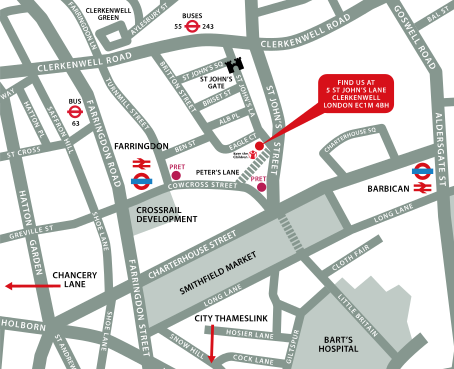
↑ Click the map to view a larger version ↑
View our London Centre Location on Google Maps
-
Canva Intermediate 1 Day - Upcoming London Course Dates
13 Oct - 13 Oct £295 + vat 10 Dec - 10 Dec £295 + vat -
Client Reviews
"I found this course to be extremely helpful. I now feel like I have a lot more confidence using the software and have a much better knowledge."
Abi Griffin, 2 Day Illustrator Advanced
"I now feel very confident with Photoshop, the last two days have helped build my knowledge of the program and I look forward to trying out the new things I have learnt."
Alex Goodman, iris Culture, Photoshop - 1 Day Introduction
"Excellent introduction to Cinema 4D, despite it being a large piece of software, lots was covered as a basic starting point."
Leigh Harrison, Logistik, Cinema 4D Two Day Introduction
"For an introductory course I think there was a great deal covered. This will enable me to go away and develop my skills even further."
Roy Craddock, Schawk
"I found the training went at a great pace and the instructor was extremely helpful and answered all the questions that were thrown at him, plus a good few tips and pointers. Very Pleased."
Antony Frangos, Pentland Brands, Cinema 4D - 2 Day Introduction
"I really enjoyed the class and learnt so much in the two days. The tutor was excellent and made the training much more fun, I would definitely consider doing more training in the future."
Katie Reeves, STI Group, Maxon Cinema 4D - 2 Day Introduction
"Training was great. Couldn't have asked for better!"
Lee Weaver, UBM, HTML & CSS - 2 Day Introduction
"A day well spent with some excellent tips on dealing with pdf workflows."
Paul Adams, Schawk, Colour Management - 1 Day Introduction
"I was first sceptical of this course, with regards to the knowledge I would gain in such a short time, but having taken this course, I could not have been happier. The tutor was fantastic, very knowledgable and helpful. I would not only recommend XChange training but would consider doing further courses myself. "
Gary Carney, none, HTML & CSS - 2 Day Introduction
"The trainer was very helpful and approachable and we got answers to all our questions. Great course!"
Aspasia Valiasi, FilmFlex Movies, Photoshop - 1 Day Introduction
 £295 + vat
Next Dates:
 13 Oct £295 + vat
10 Dec £295 + vat
Over 15 years of providing certified Canva training courses UK wide

5/5 Stars
really enjoyed course and i've already emailed my boss to get further training via this company
04/09/2026
5/5 Stars
Enjoyed the course, it was very helpful to learn more about Canva, including features I haven't used before and useful shortcuts. It was also good to learn about it from a design perspective and Simon's knowledge and design background also helped to make it interesting.
04/09/2026
5/5 Stars
Broad coverage of fairly difficult material. Excellent teaching, with enthusiasm, patience and great vision
18/06/2026
5/5 Stars
I am new to Canva and I needed to get professional guidance and this course provided me with all the answers to my queries and I will now get to practice with the video that will be sent me. Thank you
02/06/2026
5/5 Stars
Phil was a lovely teacher, very helpful in demonstrating techniques and answering any questions.
02/06/2026
5/5 Stars
I learned various Canva skills of how to create assets across all different styles. I now feel confident to make whatever material needed.
02/06/2026

4/5 Stars
Good course structure and flow. Delivered a good pace for new learners to understand and lots of oppertunity to follow along for embeded understanding.
07/05/2026
4/5 Stars
Learned new skills which is always what I want to take away from training. Also confirmed that my self taught ways were right and how I could take them to the next level.
30/04/2026
4/5 Stars
Great training session
29/04/2026
4/5 Stars
For me, I can search online for shortcuts, getting round the functionality of the software is more useful to me & knowing the idiosyncrasies that will cause me problems when I go to use it.
29/04/2026
Whats Included:
 Your choice of Windows or Mac
  Certified hands-on training
  Small class size (max 4-8)
  6 months post course support
  Authorised Course Certificate
Frequently Asked Questions
What are the course times?
For all courses in the London Centre the normal session timings are 10am to 5pm with an hour break for lunch. In addition to the hour lunch break there are also two fifteen minute coffee breaks mid morning and mid afternoon.
Daily times are:
09.45 - Registration
10.00 - Course start
13.00 - Lunch
14.00 - Afternoon starts
17.00 - Course ends
Do you offer discounts
or promotions?
We offer a range of regular discounts available for self funding individuals, charities and education along with period special offers. See our promotions page for full details.
What is provided with this course?
During the course we provide all computers for your use with choice of Windows or Mac, lunch and refreshments along with pads & pens. After the course you will receive the authorised Certificate, quality reference manual and 6 months direct post course support.
Does this course give
a qualification?
Although this course does not provide an actual qualification each delegate is provided with an official Certificate for completion of the course level.
Can you invoice my company?
In short yes we can provide 30 day invoice terms to any UK Limited company with the provision of your official purchase order and/or completing the invoice request for your booking online.

Adobe Design Ready in just 5 days!
Learn Adobe Design skills with our value Adobe Design Masterclass Bundle →